
Mastering the AI Shorts Maker to Create Viral Videos
An AI shorts maker is essentially a creative partner that automates the whole process of making short-form videos for platforms like YouTube Shorts, TikTok, and Instagram Reels. You feed it a simple text idea, and it handles the rest—generating the visuals, adding motion, and spitting out a ready-to-post clip. It's an incredibly powerful way for creators to churn out engaging content without getting bogged down in the technical details.
The New Reality of Social Video Content
Let's be honest, the days of spending hours meticulously editing a single 30-second video are behind us. We've moved from a world of manual labor to an automated, creative flow. This shift means anyone, regardless of their editing skills or budget, can produce high-quality, eye-catching content. We're not just talking about slapping a filter on a video; modern AI tools build entire cinematic scenes from scratch based on a few words.
This whole movement is being propelled by insane demand. The global short video market is expected to skyrocket from USD 53.48 billion in 2025 to a whopping USD 106.22 billion by 2032. A huge part of that growth comes from AI-driven tools that make content more personalized and keep users hooked.
From Manual Labor to Creative Flow
Think about the traditional video workflow. It was a grind. You had to script, film, chop up clips, find audio, write captions—it was a massive time sink that completely killed momentum. An AI shorts maker basically flattens that entire process into a couple of clicks.
This simple workflow diagram nails it.
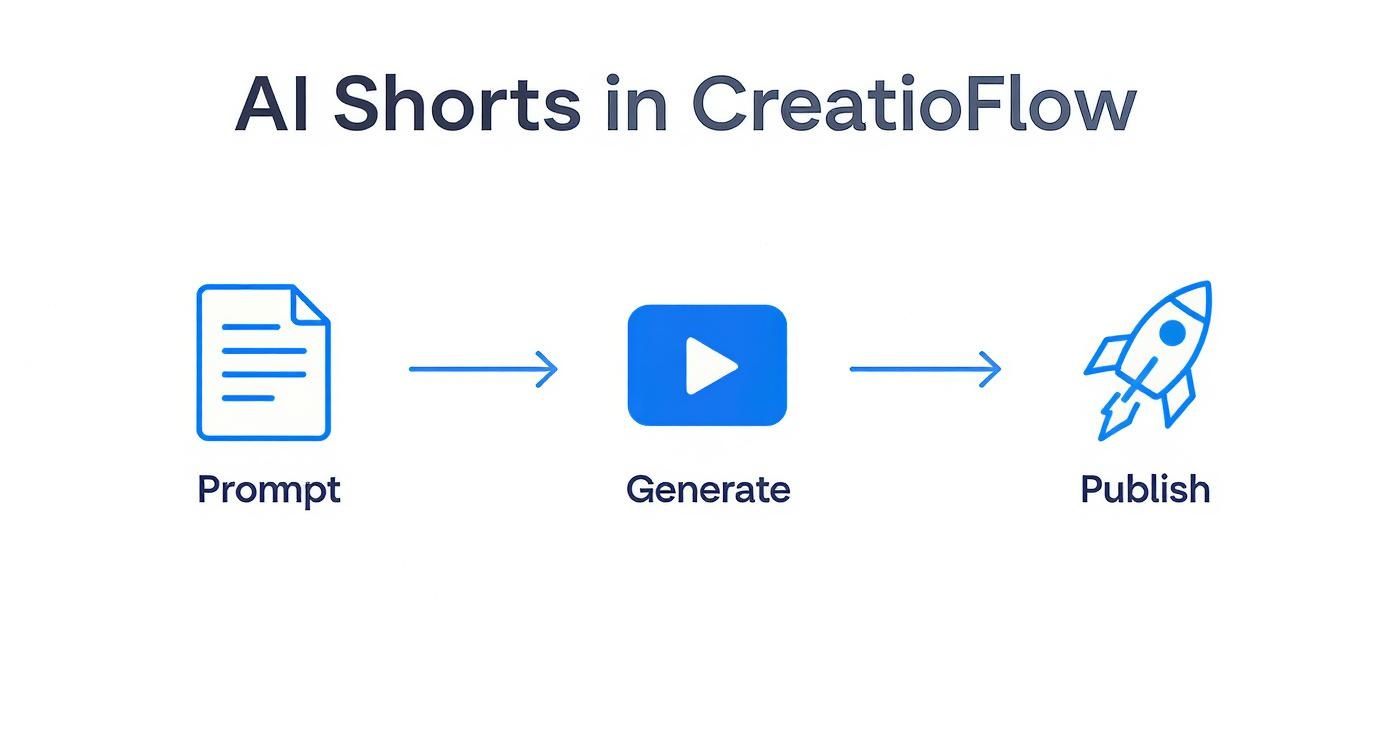
It perfectly shows how a creator can go from a basic text prompt to a fully generated video, ready for publishing, in just a fraction of the time it used to take.
AI Shorts Maker Feature Overview
To give you a better idea of what these platforms can do, here’s a quick rundown of their core features. These tools are much more than simple video generators; they offer a full suite of creative controls.
| Feature | What It Does | Primary Benefit |
|---|---|---|
| Text-to-Video Generation | Converts written prompts into animated video clips. | Creates original visuals from scratch, no filming required. |
| Image-to-Video Animation | Breathes life into static images with motion and effects. | Turns existing art or photos into dynamic video content. |
| Cinematic Style Control | Applies specific visual styles (e.g., "dramatic lighting," "80s film"). | Quickly sets a professional tone and mood for your video. |
| Aspect Ratio Formatting | Automatically crops and formats video for vertical platforms. | Ensures your content is perfectly optimized for Shorts, Reels, and TikTok. |
| AI-Powered Upscaling | Increases video resolution for a crisp, high-definition look. | Delivers a polished, professional final product without pixelation. |
| Automated Editing | Handles scene transitions, pacing, and simple cuts. | Saves hours of manual editing time, accelerating production. |
This combination of features is what makes modern AI tools so effective, allowing creators to focus more on the idea and less on the execution.
Why This Shift Matters for Creators
This new wave of technology truly levels the playing field. It's a game-changer for solo creators and small businesses who can now produce content that looks just as good as something from a big studio, but without the massive overhead.
Learning how to properly use an AI Shorts Creator is becoming a crucial skill. It gives you back your most valuable asset—time—so you can focus on the big picture: strategy, community building, and coming up with your next great idea.
The real win here is efficiency. Instead of dedicating an entire day to making one 30-second video, you can generate a dozen different versions in minutes. This lets you A/B test your ideas and quickly figure out what your audience actually wants to see.
This approach makes rapid experimentation possible, helping you dial in your content strategy faster than ever. It fundamentally changes how we think about, create, and share social video.
How to Write Prompts That Generate Cinematic Results
Everything hinges on your prompt. Everything.
If you want your AI-generated shorts to have that cinematic feel, you have to stop thinking like a user and start thinking like a film director. A simple phrase like "a cat jumping" will get you exactly that—a generic, soulless clip. But if you want to create something memorable, you need to feed the AI rich, detailed instructions.
Think of it this way: a powerful AI shorts maker is your camera, your crew, and your special effects team all rolled into one. But it still needs a director—you—to tell it what to do. Vague instructions lead to vague, uninspired footage.
The Anatomy of a Powerful Prompt
A truly great prompt isn't a single idea; it's a carefully constructed blueprint made of several key components. When you combine these elements, you’re not just describing a scene—you’re building a world for the AI to render.
Here are the essential building blocks I always use:
- The Subject: Get specific. Don't just say "a man." Instead, try "a weary detective in a wrinkled trench coat." The details matter.
- The Action: What is the subject doing? "Walking" is boring. "Striding purposefully through the pouring rain" tells a story.
- The Environment: This is your set design. "A city street" is forgettable. "A neon-drenched alleyway in a futuristic city at midnight" is a whole vibe.
- The Lighting: This is your secret weapon for mood. Keywords like "golden hour lighting," "dramatic volumetric rays," or "harsh fluorescent glow" can completely change the tone of your shot.
When you weave these together, a bland concept like "a car driving" evolves into something compelling: "a vintage muscle car speeding down a deserted coastal highway at sunset, golden hour lighting glinting off the chrome." See the difference? That's the leap from a simple clip to a micro-story.
Directing the AI Camera
This is the part most people miss. You can actually direct the virtual camera. By telling the AI how to frame the shot, you can introduce dynamism and a professional polish that sets your content apart.
The most overlooked element in AI video prompting is camera direction. Simply adding 'low-angle shot' or 'dynamic aerial view' can completely change the perspective and emotional impact of a scene, making the viewer feel either powerful or small.
Start thinking like a cinematographer and sprinkle these terms into your prompts:
- Shot Type: Wide shot, medium shot, close-up, extreme close-up.
- Camera Angle: Low-angle shot, high-angle shot, eye-level, Dutch angle.
- Camera Movement: Panning shot, tracking shot, dolly zoom, slow-motion.
A great example would be something like, "dynamic aerial view following an eagle soaring over a misty mountain range." This command tells the AI not just what to film, but how to film it.
Defining the Artistic Style
Finally, you need to give the AI your art direction. What's the overall aesthetic? This is where you lock in the visual texture and ensure the output feels intentional and consistent with your vision.
- For realism: Use terms like "photorealistic," "hyper-detailed," or "8k UHD." These tell the AI you want something that looks like it was shot on a high-end camera.
- For artistic flair: I love using phrases like "cinematic," "film grain," "anamorphic lens flare," or "vibrant color grading." These add a layer of professional post-production feel.
- For specific styles: Don't be afraid to reference entire genres. You can call out a "cyberpunk aesthetic" or a "fantasy art style" to guide the AI’s creative engine.
When you put it all together, you can create a world-class prompt that leaves nothing to chance: "Close-up shot of a stoic astronaut gazing out a spaceship window at a swirling nebula, reflected in her visor, cinematic, dramatic lighting, hyper-realistic, 8k."
Now that’s a prompt. An AI shorts maker given that level of detail has everything it needs to generate something genuinely breathtaking.
Choosing the Right AI Model for Your Vision
Once your prompt is dialed in, you’ve reached the next critical step: picking the right AI generation model. This is where your creative vision really starts to take shape. Not all models are built the same; think of each one as an artist with a signature style. This choice is what separates a generic, forgettable clip from a video that perfectly nails the aesthetic you’re going for.
It’s a lot like a filmmaker choosing between different film stocks or camera lenses. A model trained on photorealism will stumble if you ask it for a whimsical anime scene, and the reverse is just as true. A great ai shorts maker, like the one built into the Auralume AI platform, gives you a whole toolbox of leading models so you can match the right one to the job.
Photorealism vs. Stylized Aesthetics
The first big decision you'll face is whether you want your video to look real or lean into a more artistic interpretation. Each path requires a different kind of AI engine to really deliver.
-
For Photorealistic Content: You'll want to find models known for their grounding in reality. These are perfect for things like product mockups, architectural visualizations, or cinematic scenes that feel like they were shot on a real camera. Your prompts should focus on real-world lighting, textures, and camera effects.
-
For Fantasy and Anime: On the other hand, some models are absolute masters of stylized visuals. They can spit out mind-blowing fantasy landscapes, slick anime action, or abstract art that would be impossible to film. For these, your prompts need to embrace artistic descriptors and genre-specific language.
This demand for variety is driving huge growth in the AI video generator market. After being valued at USD 554.9 million in 2023, it's on track to hit an incredible USD 1.96 billion by 2030 as more creators see the value in these tools.
My best advice? Test different models with the exact same prompt. You'll be amazed at how one model interprets "a majestic dragon" with gritty, realistic scales, while another creates a vibrant, illustrative masterpiece. There's no single "best" model—only the best model for what you're trying to create.
As you explore your options, it can be useful to compare various AI video clipping tools like Swiftia, Opus Clip, Klap, and Spikes Studio and see how different platforms integrate these core technologies.
From Still Image to Dynamic Video
Sometimes, starting from scratch isn't what you need. A really powerful workflow is animating a still image you already have. This is a complete game-changer for artists, photographers, and designers looking to bring their static work to life.
With this approach, you keep total control over the initial composition. You just upload your image and then tell the AI what kind of subtle camera movements to add.
- Pan: Creates a smooth horizontal sweep.
- Tilt: Moves the virtual camera up or down.
- Zoom: Pushes in on a detail or pulls out to reveal the full picture.
This technique adds a professional, parallax-like depth to your photos, instantly turning a flat image into an engaging short. It's the perfect way to breathe new life into your existing portfolio for social media, giving your best work a dynamic edge that stops scrollers in their tracks.
Bringing Your AI-Generated Clips to Life
Alright, you've generated a folder full of incredible, cinematic clips. That’s a huge win, but now comes the fun part: weaving them together into a story. This is where you switch hats from director to editor. A good AI shorts maker is more than just a generator; it’s your editing suite, giving you the power to turn raw assets into something truly compelling.
The very first thing I focus on is pacing. Short-form video is all about momentum. You have to be ruthless. Trim every last bit of fat from your clips. If a shot lingers for half a second too long, it’s gone. Every single frame needs to earn its place and drive the narrative forward. You'd be surprised how much tighter a video feels when you shave off those tiny, seemingly insignificant pauses.
Creating a Seamless Visual Flow
Once you have your core clips tightened up, it's time to connect them. While a hard jump cut has its place in high-energy, chaotic edits, a more cinematic style often calls for smoother transitions to guide the viewer.
- Cross Dissolve: This is my personal favorite for blending scenes. It creates a soft, almost dreamlike feel that’s perfect when you're shifting between different times or locations.
- Fade to Black: Don't overuse this one, but when you do, it adds real dramatic weight. Fading out gives the audience a beat to process a powerful moment before you move on.
- Whip Pan: When the energy needs to spike, a quick, simulated whip pan can stitch two action shots together, making the movement feel frantic and seamless.
It's these little details that make a video feel intentional and polished, separating your work from the endless scroll of amateur content.
Building an Immersive Soundscape
Visuals hook people, but it’s the audio that keeps them emotionally invested. A great short is a carefully layered symphony of sound. Luckily, most modern platforms have built-in libraries of licensed music and sound effects that make this surprisingly easy.
I always start by finding a music track that sets the foundational mood. Is it an epic orchestral score for a fantasy world? A chill lo-fi track for something more relaxed? Once that's in place, I start layering in sound effects (SFX) to make the scene feel alive. The subtle whoosh of wind, the low hum of a city, the crunch of leaves underfoot—these are the sounds that transform a digital creation into a tangible world.
The biggest mistake I see new creators make is overlooking ambient sound. A video with just a music track feels hollow and artificial. Add a simple background loop of a bustling cafe or a gentle breeze, and suddenly your AI world feels grounded and believable.
Why 4K Upscaling is Non-Negotiable
Finally, let's talk about the final polish that elevates everything: upscaling. After all the work you've put into the visuals and sound design, the last thing you want is a blurry, pixelated mess on someone's high-res phone. This is where AI upscaling becomes your secret weapon.
Using a built-in upscaler, you can boost your video's resolution to a crisp 4K. The AI intelligently adds detail and sharpens the image, ensuring your final export looks professional and clean. For anyone serious about making an impact on platforms like YouTube Shorts and TikTok, where visual quality is king, this step is absolutely essential.
Polishing Your Short for Maximum Reach
Alright, you've created a stunning video. The hard part's over, right? Not quite.
Creating a cinematic clip is only half the battle; getting it seen is the other half. Even the most incredible AI-generated short can get completely lost in the noise if you don't optimize it for the platforms. This is where your creation meets the algorithms of YouTube Shorts, TikTok, and Instagram Reels.
Before you even think about hitting that upload button, let's get your export settings dialed in. This isn't just a best practice—it's essential if you want your work to look professional. Always export in a 9:16 vertical aspect ratio to fill the entire mobile screen. Aim for a resolution of 1080x1920 pixels, which gives you a sharp image without an enormous file size. The MP4 format is your go-to, as it’s the universal standard that works flawlessly everywhere.
Tailoring Your Content for Each Platform
Here's a reality check: a one-size-fits-all approach just doesn't fly in short-form video. Each platform has its own vibe and discovery engine. You have to adapt your captions, audio, and hashtags to fit the culture of where you're posting.
Take YouTube Shorts, for example. It's an absolute behemoth. In 2024, it hit 2.3 billion monthly active users and pulled in over 70 billion daily views. That's a massive potential audience. The algorithm heavily favors content that holds viewer attention, which means your first 3 seconds are make-or-break. You can dive deeper into the growth stats for YouTube Shorts on voomo.ai.
The real secret to optimization isn't just about the technical stuff. It's about understanding how people behave on each app. A TikTok user expects a fast, trend-based hook. A YouTube Shorts viewer might stick around for a slightly more narrative clip. You have to tailor those crucial opening moments.
The Art of Captions, Audio, and Hashtags
Think of your caption as your first, and maybe only, chance to stop the scroll. It needs to be a hook. Ask a question, make a bold claim, or create some serious curiosity. Ditch the generic descriptions and write something that adds real value or starts a conversation.
Audio is just as critical. Here’s how I think about sound:
- Trending Audio: Hopping on a trending sound on TikTok or Reels can give your video an instant boost. It plugs your content directly into a larger, ongoing conversation.
- Original Audio: If you’ve created a unique voiceover or soundscape, make sure it’s crisp and clear. Platforms are increasingly pushing original, creative audio.
- Text Overlays: Don't forget to add on-screen text. A staggering 85% of social videos are watched with the sound off, so text overlays aren't just a nice-to-have; they're vital for grabbing and holding attention.
Finally, let's talk hashtags. They're the signposts that guide the algorithm. I've found the best strategy is to use a mix of broad, high-volume tags (like #AIart) with more specific, niche tags (like #cinematicAIvideo). This approach helps you reach a wide audience while also attracting viewers who are genuinely looking for your exact type of content.
Common Questions About AI Shorts Makers
https://www.youtube.com/embed/37TU8e0GlMw
Jumping into any new creative tool always comes with a few questions. When it comes to something like an AI shorts maker, you’re probably wondering about the real-world stuff: How much does it cost? Can I use my own assets? What are the actual limits of this technology right now?
Getting straight answers helps you figure out what’s possible and how to get the most out of these platforms.
Most tools operate on a subscription model, where you get a certain number of video generation credits per month. You'll often find a free trial to let you get your feet wet, which I always recommend. Paid plans typically unlock more credits, faster generation speeds, and premium features like upscaling to 4K.
A big question for creators, especially brands, is whether they can bring their own visual elements into the mix. The answer is a resounding yes.
Can I Use My Own Images or Logos?
Absolutely. In fact, this is one of the most powerful features for anyone trying to maintain a specific look or brand identity. Top-tier platforms like Auralume AI give you several ways to do this:
- Animate Your Photos: Have a great still image or a piece of digital art? You can upload it and let the AI add subtle, cinematic motion to bring it to life.
- Incorporate Logos: Most tools let you add your logo as a persistent watermark, which is essential for branding your content across different social platforms.
- Use an Image as a Reference: This is a game-changer. You can upload a source image to guide the AI, heavily influencing the style, color palette, and composition of the video it generates.
This flexibility is key. It means you’re not stuck with purely AI-generated visuals. You can blend your own creative assets with the magic of generative video, creating a hybrid style that’s uniquely yours.
What Are the Current Limitations?
As amazing as this technology is, it’s not perfect. It's good to know where the weak spots are so you can work around them.
For one, getting perfect character consistency across multiple shots is still a huge challenge. The AI might struggle to recreate the exact same face or outfit from clip to clip. Other tricky areas include fine details like realistic hands, legible text appearing within a scene, and nuanced human emotions.
The trick is to play to the AI's strengths. Instead of trying to create a complex narrative with recurring characters, focus on crafting visually stunning scenes, abstract animations, or mind-bending montages. That's where it truly shines.
The good news? This field is moving at an unbelievable speed. Many of these limitations are being tackled with every new model update, so what's a challenge today might be a standard feature tomorrow.
Ready to stop spending hours editing and start generating cinematic shorts in seconds? Auralume AI gives you access to the world's leading video models in one simple platform. Try Auralume AI and bring your ideas to life today!