
How to Create Explainer Videos That Convert
Before we jump into the "how-to," let's take a step back and look at why explainer videos are such a big deal. A great explainer video isn't just another piece of marketing content. When done right, it's a strategic tool that can cut through the noise, clarify complex ideas, and get people to actually do something.
Why Explainer Videos Actually Work
The magic of an effective explainer video lies in how it taps into basic human psychology. We're visual creatures. A well-crafted video can take a complicated product or a nuanced service and break it down into a simple, easy-to-follow story—often in 90 seconds or less. For any business that’s ever struggled to get its value proposition across quickly, this kind of clarity is a game-changer.
Think about it from your customer's perspective. Instead of slogging through paragraphs of text, they can watch a short video and instantly get it. This isn't just about making things easier; it's about making your message stick. Combining audio and visuals helps embed your message in a viewer's memory far more effectively than text ever could.
Turning Viewers into Customers
The numbers don't lie—there's a direct line between explainer videos and better business results. These aren't just fluffy educational tools; they are powerful conversion machines. For anyone in the software game, mastering SaaS video marketing strategies is non-negotiable for explaining complex features and engaging the right people.
Just look at the practical benefits:
- Fewer Support Tickets: A clear explainer video answers common questions before they're ever asked, taking a load off your support team.
- Higher Conversion Rates: Dropping an explainer video on a landing page is one of the fastest ways to boost sign-ups and sales.
- Better Lead Quality: When people watch your video, they come to the table already understanding what you do. That makes for a much more productive sales conversation.
A sharp, 90-second video can create that "aha!" moment for a potential customer in a way that pages of text and hours of sales calls often can't.
The market has already caught on. As of 2025, a staggering 73% of video marketers have created explainer videos, cementing its status as the most popular video marketing tactic out there. The industry around interactive explainer video software is also booming, projected to more than double to USD 3.2 billion by 2030. You can dig deeper into these video marketing trends over at motionplaystudio.com.
This screenshot gives you a glimpse into just how versatile the explainer video format can be.
As you can see, the possibilities are endless—from simple 2D animations that are perfect for abstract concepts to live-action videos that forge a real human connection. Putting real thought and effort into your video strategy delivers a clear return, which is all the motivation you need to get it right from the very beginning.
Building Your Pre-Production Blueprint
A great explainer video doesn't just happen in the editing suite. It’s won or lost long before you hit record. Think of this pre-production phase as your strategic blueprint. Skipping it is like trying to build a house without architectural plans—you're guaranteeing a wobbly structure, costly revisions, and a final product that just doesn't work.
Your very first job is to nail down your core message. I mean, what is the one single thing your viewer absolutely must understand by the time the video ends? It’s tempting to throw in every cool feature or benefit, but that's a classic mistake. You’re aiming for razor-sharp clarity, not a user manual. A confused mind never buys. They just leave.
Once that message is crystal clear, you need to know exactly who you're talking to. "Small business owners" is way too broad. Get specific. Are you talking to a frazzled marketing manager at a B2B software company who can't make sense of their lead attribution? Or is it a freelance photographer drowning in spreadsheets and looking for a better way to manage clients? Each of these people requires a totally different tone, different language, and a different hook to grab their attention.
Defining Your Destination
With your message and audience locked in, it's time to set real, measurable goals. An objective like "increase engagement" is useless because you can't track it effectively. You need goals that tie directly back to business results.
Here are a few examples of what strong goals look like:
- Boost landing page sign-ups by 15% in the first three months after launch.
- Cut down on customer support tickets about a specific feature by 20% within 60 days.
- Increase the click-through rate in our new user email series by 10%.
By setting specific targets, you turn your explainer video from a 'nice-to-have' creative piece into a hard-working marketing asset with a clear purpose and a measurable ROI.
This simple flow shows how a well-planned explainer moves a viewer from confusion to clarity, and ultimately, to action.
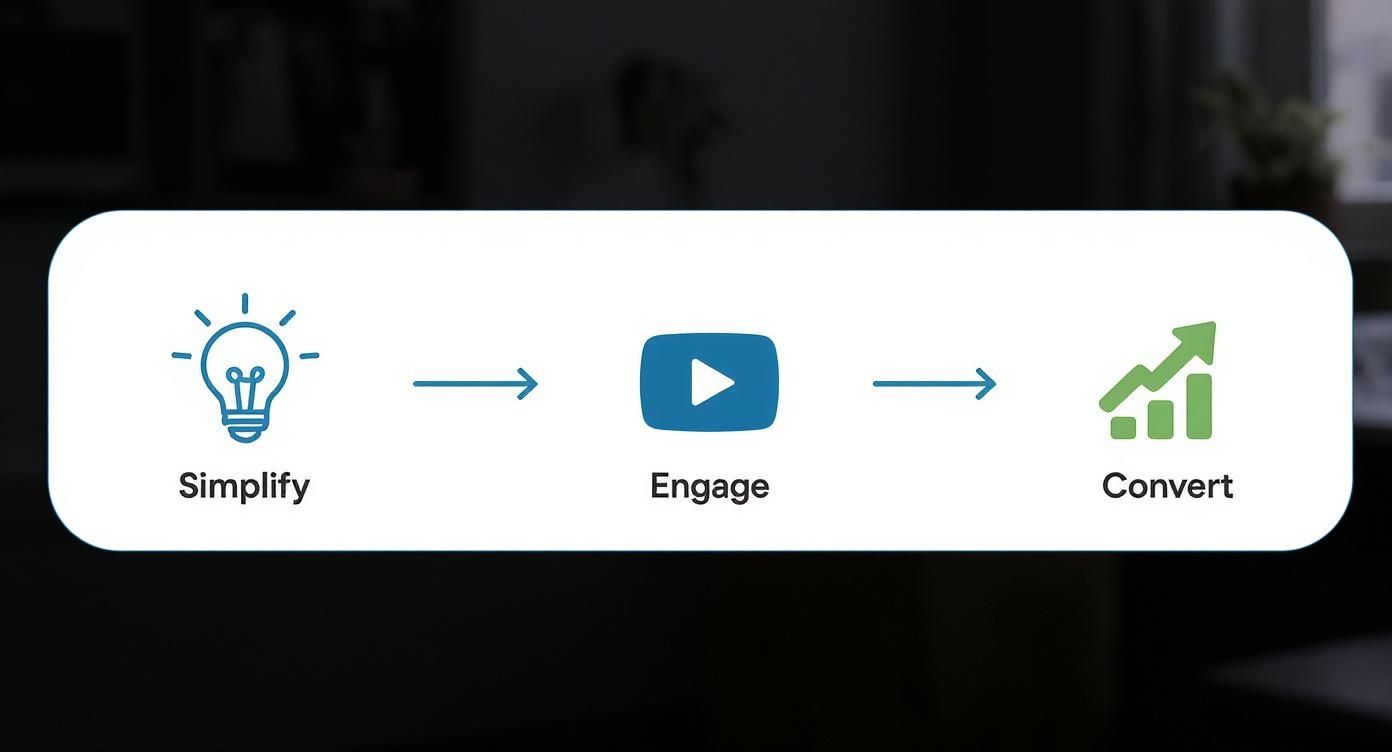
Each step builds on the last, guiding a potential customer along the path from curiosity to a decision.
Choosing Your Visual Style
Finally, you can decide on the look and feel. The visual style isn't just about what's trendy; it needs to be the right vehicle for your message, a perfect match for your brand, and something that fits your budget.
Here’s a quick rundown of the most common styles I see work well:
- 2D Animation: Super versatile and often budget-friendly. It’s perfect for breaking down abstract ideas or telling a story that needs a touch of personality.
- Motion Graphics: Your best friend for data-heavy content. Think animated text, slick charts, and dynamic icons that make complex information easy to digest.
- Live-Action: Nothing builds trust and a human connection quite like seeing real people. This is fantastic for customer testimonials or showing off a physical product.
- Screencast: The undisputed king for software demos and how-to guides. It’s a straightforward way to walk someone through a process on-screen.
Putting in the work on these pre-production steps—your message, audience, goals, and style—gives you the solid foundation you need. This blueprint ensures every decision you make from here on out is deliberate and aimed at one thing: creating a video that actually gets results.
Writing a Script That Connects and Converts

Let's be clear: your script is the soul of your video. You can have the most breathtaking animation, but if the story doesn't land, your video will fall flat. This is where you build the entire foundation. It’s not just about listing features; it's about crafting a narrative that guides a viewer from being curious to taking action, ideally in 90 seconds or less.
The best scripts I’ve seen all follow a simple, timeless storytelling structure. You’re not just selling a product; you're taking your audience on a short journey that makes your solution feel like the only logical next step.
The Problem-Solution-Benefit Framework
This isn't some complex industry secret; it's a classic model that works because it starts with the viewer's world, not yours. It mirrors how we naturally solve problems.
First, you need to grab their attention immediately. You’ve got about eight seconds, maybe less. Start with a pain point your ideal customer knows all too well. A relatable question or a quick scenario works wonders. A project management tool, for example, could open with, "Still trying to track team progress across five different spreadsheets and a dozen email chains?" That hits home.
Once they're nodding along, it's time to introduce your product as the hero. This is your "what if" moment. Avoid technical jargon and just state how you solve the problem you just laid out. Following our example, you’d say, "What if there was one place where all your team's tasks, deadlines, and conversations lived in perfect harmony?"
Now, briefly show how it all works. Pick two or three key features and connect them directly to a tangible benefit. It's never about the feature itself, but what that feature does for the user.
- Instead of: "Our tool has automated reporting."
- Try: "With automated reporting, you can finally get your weekends back instead of spending hours building slides."
A great script doesn't sell a product; it sells a better version of the customer's life. Focus on the outcome—less stress, more time, bigger profits—and the features become the logical path to get there.
Finally, wrap it up with a crystal-clear call to action. Don't be vague. Tell them exactly what to do next, and make it sound easy. "Click the button below to start your free trial," or "Visit our website to see a personalized demo."
To help you visualize this structure, here's a simple breakdown for a standard 90-second explainer.
Anatomy of a High-Converting Explainer Script
| Section | Purpose | Time Allotment (Seconds) | Approximate Word Count |
|---|---|---|---|
| The Hook | Grab attention with a relatable problem or a compelling question. | 0-15 | 35-40 words |
| The Solution | Introduce your product/service as the answer to the problem. | 15-45 | 70-75 words |
| How It Works | Showcase 2-3 key features and link them to clear benefits. | 45-75 | 70-75 words |
| Call to Action | Tell the viewer exactly what to do next, with a sense of urgency. | 75-90 | 35-40 words |
This table provides a great starting point, but always remember to adjust based on the natural flow of your own message.
Keeping Your Script Conversational
Nobody wants to be lectured by a robot. Your script needs to sound like a real person talking. The easiest way to check this? Read it out loud. If you stumble over a sentence or it feels stiff and formal, it’s time for a rewrite.
A solid rule of thumb is that 150 words of spoken text equals about one minute of video time. That means for a 90-second video, you should aim for around 225 words. This keeps the pace brisk and holds your audience's attention.
Use simple language. Short sentences are your friend. They make the script easier to understand and give the voice-over artist room to add inflection and personality. The goal is to connect, and the only way to do that is by sounding genuinely human.
Bringing Your Story to Life with Production
Alright, your script is locked in. Now for the fun part: turning that blueprint into an actual video. This is the production phase, where all the planning—the message, the audience research, the storyboard—finally becomes something tangible. For many, this is the most daunting step in creating an explainer video, but it really doesn't have to be.
First things first, you need to decide who is going to handle the work. The great news is that video production is more accessible than ever. Market data shows that 55% of video marketers stick with in-house teams, while 14% outsource everything and 31% use a hybrid approach. This flexibility means there’s a solid option no matter your budget or team size.
Selecting Your Production Toolkit
With the script as your guide, picking the right video maker tools is the next critical decision. The software you choose will define your entire workflow and have a massive impact on the final product.
- For Beginners and DIY Marketers: If you're just starting out, platforms like Vyond or Powtoon are lifesavers. They’re built around drag-and-drop editors and a huge library of templates, letting you build a professional-looking animation without needing a design degree.
- For Experienced Creatives: For those with more experience under their belt, nothing beats the power of Adobe After Effects. It offers complete creative freedom, but be warned—the learning curve is steep. The payoff is a totally custom animation that perfectly embodies your brand.
The best tool isn't the most complex one; it's the one that allows you to execute your vision efficiently and effectively. Don't get bogged down by features you don't need.
AI has also thrown some powerful new options into the mix. If you want to move fast, tools like https://www.auralumeai.com/ can take your text prompts and generate high-quality video clips in seconds. This is incredibly handy for visualizing concepts from your storyboard or even creating a rough cut for a human editor to polish.
Finding the Right Voice and Vibe
Visuals are a huge piece of the puzzle, but they're not the whole thing. The audio—specifically the voice-over and background music—is what gives your video its personality and emotional weight.
I can't stress this enough: a professional voice-over is one of the smartest investments you can make. A talented artist can bring your conversational script to life, using the perfect pacing and tone to keep your audience hooked. The wrong voice, on the other hand, can make even the most brilliant script fall completely flat.
The same goes for music. Your background track should support the mood, not fight it for attention. A common mistake I see is picking music that's way too loud or distracting. The music's job is to add a subtle layer of energy or emotion that backs up the narrative without drowning out the voice-over. It’s all about creating a cohesive experience where the visuals, voice, and music all tell the same story.
Distributing Your Video for Maximum Impact
Alright, your video is done. It's polished, approved, and ready to go. So, now what? The single biggest mistake I see people make is just tossing it up on YouTube and hoping for the best. A great explainer video isn't just a creative asset; it's a workhorse for your marketing, and it needs a smart distribution plan to actually deliver results.
Think of your video as a versatile tool, not a one-and-done piece of content. Its primary home should always be your own website, placed right where it can do the most good—your homepage or a key landing page is perfect. It’s the first thing many visitors will see, and it can clarify what you do in seconds, pushing them toward that "buy now" or "sign up" button.
Optimizing Your Video for Discovery
Before you start embedding your video everywhere, you need to give it a fighting chance on its native platform, which is usually YouTube or Vimeo. This is where you can grab the attention of people who are actively searching for the exact problem you solve.
Nailing the video SEO basics is non-negotiable:
- A Keyword-Rich Title: Don't call it "Our Explainer Video." Think from your customer's perspective. Something like "How to Create Explainer Videos for Your Business" will perform infinitely better.
- A Detailed Description: This is your chance to write a mini-summary of the video, drop in relevant links, and weave in your target keywords naturally. You're telling both people and search engine bots what your video is all about.
- A Compelling Thumbnail: Your thumbnail is basically a billboard for your video. Create a custom one with bold, clear text and an image that makes people curious. Never, ever let the platform pick a random, blurry frame for you.
A great video is useless if no one sees it. Treat distribution with the same level of care and strategy as you did the scriptwriting and production phases. Your goal is to get your content in front of the right eyeballs at the right time.
The numbers back this up in a big way. We know that 98% of people have watched an explainer video to learn more about a product or service. Better yet, 85% are more likely to buy after watching one. And for your website? Landing pages with video can see conversion rates jump by as much as 80%. You can dig into more of these powerful video marketing statistics on wyzowl.com.
Extending Your Reach Beyond Your Website
Your website is just the starting point. To really get your money's worth, you have to meet your audience where they hang out online. This means slicing and dicing your main video into smaller, platform-specific clips.
For example, you could create a 30-second, square version for your Instagram feed that focuses on the core problem and solution. Or, pull out one killer tip and turn it into a vertical video for TikTok or YouTube Shorts. This content repurposing strategy gives your video a much longer lifespan and helps your message land effectively on different channels.
Finally, don't forget email. Weave your video into your welcome series for new subscribers or use it in lead-nurturing campaigns to re-engage people who have gone cold. An email with an eye-catching video thumbnail is so much more clickable than a wall of text, giving you one more powerful way to connect with your audience.
Got Questions About Explainer Videos? We've Got Answers.
If you're just starting to explore video, you probably have a few questions swirling around. I hear them all the time. Getting these nailed down before you start will save you a ton of headaches and help you create something that actually gets results.
How Long Should My Explainer Video Be?
Keep it short. The ideal length is right around 60 to 90 seconds.
That’s the sweet spot to grab someone's attention, clearly state the problem they're facing, present your product as the solution, and tell them what to do next. After about two minutes, you'll see viewer engagement fall off a cliff.
If your product is really complex, don't try to cram everything into one epic video. Trust me, it won't work. A much better strategy is to create a series of shorter videos, each focused on a specific feature or benefit. It’s more respectful of your audience's time and makes the information way easier to absorb.
What's a Realistic Production Budget?
This is the classic "it depends" question. Explainer video costs are all over the map, and what you spend will really shape the entire project. Setting a clear budget upfront is one of the most important first steps.
Here’s a rough idea of what you might be looking at:
- DIY Software: For tools like Vyond or Powtoon, you're looking at $50 to $200 a month. This is a solid, budget-friendly route for straightforward animations.
- Freelance Animators: Hiring a freelancer can set you back anywhere from $500 to $5,000. The final price tag really depends on their portfolio and how complicated your project is.
- Full-Service Agency: If you go with a professional agency, expect to start at $2,000 and potentially go well over $15,000 for high-end, completely custom animation.
Remember, a bigger budget doesn't automatically mean a better video. I've seen brilliant, scrappy DIY videos run circles around expensive agency productions that missed the mark on messaging. The story and script are always more critical than the price tag.
Can I Just Have an AI Make the Whole Thing?
Not quite yet. While AI tools are incredible for speeding things up, they can't handle the whole process from concept to final cut on their own. Think of AI as your super-powered assistant, not the director.
AI is fantastic for brainstorming script ideas, generating a quick storyboard to get you started, or even creating a scratch voice-over. But when it comes to the final polish—the animation, editing, and strategic thinking that makes a video truly resonate with people and feel like your brand—you still need that human touch.
Ready to bring your ideas to life without the steep learning curve? Auralume AI turns your text prompts and images into stunning, cinematic videos in seconds. Generate professional-quality clips, animate still images, and access the world's leading AI video models all in one place. Start creating your next video with Auralume AI today.