
Turn Image Into Video AI for Cinematic Results
You can turn an image into a video with AI by giving a specialized platform your picture and a few instructions. Using simple text prompts, you describe the motion, camera angles, and special effects you want to see. The AI gets to work, analyzing your image and generating a short, cinematic clip that brings your idea to life.
The New Frontier of AI Motion Graphics
Not long ago, generating motion from a single frame was a trick reserved for Hollywood VFX studios. Now, it's a powerful creative tool that anyone with an idea can use. This shift is fundamentally changing how marketers, artists, and content creators approach visual storytelling, letting them break free from static graphics and dive into dynamic, scroll-stopping video.
The concept is simple but powerful. You provide the canvas—your image—and the AI becomes your personal animator. It interprets your text-based directions to add life, depth, and believable movement that actually tells a story, rather than just making a picture wiggle.
Why This Changes Everything
This new way of working completely lowers the barrier to video production. You don't need to be a wizard with complex software anymore; you can direct cinematic scenes with just your words. This has unlocked a world of possibilities.
- Social Media Marketers can create eye-catching animated product shots from a single high-quality photo.
- Digital Artists are adding subtle, atmospheric motion to their illustrations to pull viewers deeper into their fantasy worlds.
- Content Creators can generate unique B-roll or animated elements for their YouTube videos without ever touching a camera.
This simple diagram breaks down how a static image gets transformed into a compelling video clip.
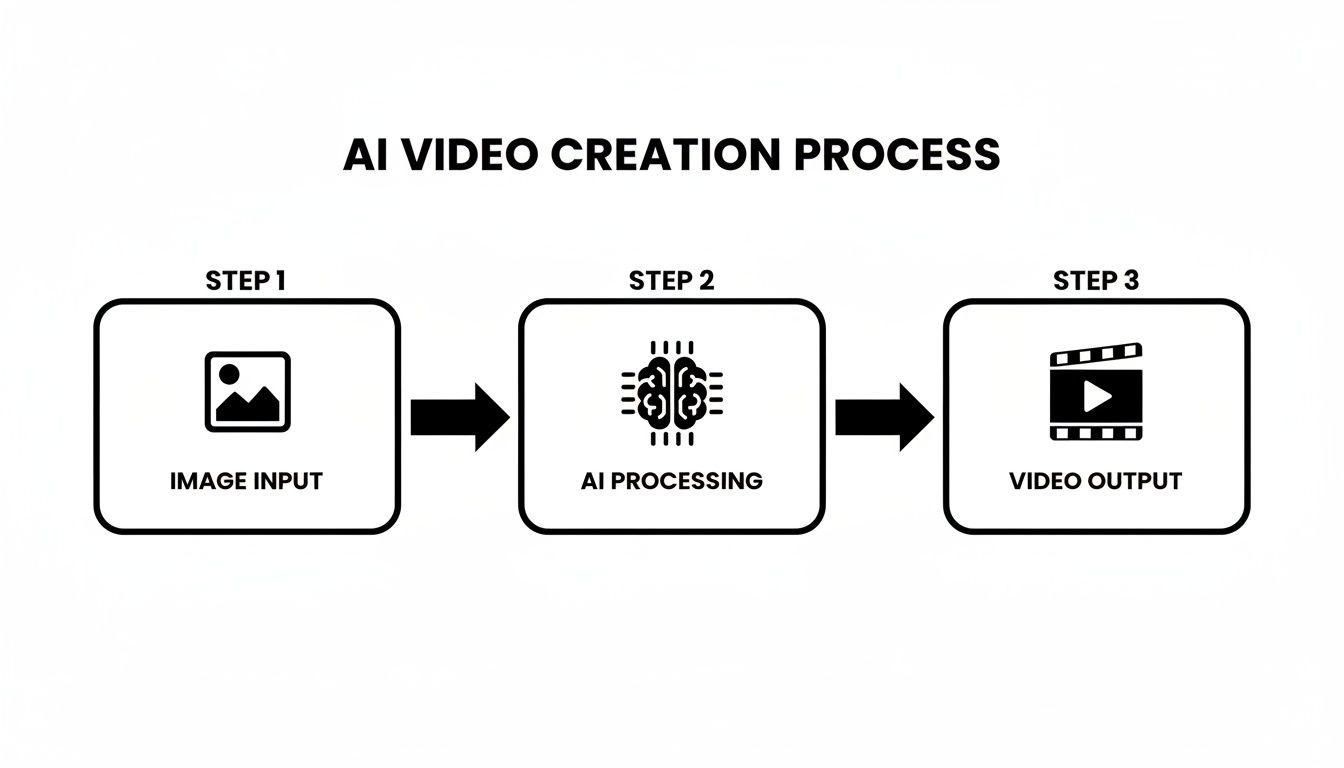
As you can see, the journey from a still photo to a dynamic video is a clean, three-part flow that makes creating content faster than ever before.
The Rapid Rise of AI Video
The creative world has jumped on these new tools. In 2023 alone, AI-powered videos racked up over 1.7 billion views on YouTube, and the pros are adopting this tech at a breakneck pace. The share of video professionals using AI in their work skyrocketed from just 18% in 2023 to a staggering 41% in 2024. That's a massive shift in how videos get made.
If you’re focused on animating still images, a dedicated AI picture animator can offer specialized features for creating "living photos." Platforms like Auralume AI are particularly useful because they bring multiple AI models together under one roof, giving you a full creative suite for any image-to-video project.
Choosing the Right Image for AI Animation
The final video you create is only ever going to be as good as the image you start with. If you really want to turn an image into a video AI can work magic with, you have to pick a picture with both solid technical quality and real artistic potential. Think of it like giving a painter a high-quality canvas—the more detail and depth you provide the AI, the more believable and dynamic your final animation will be.
It all boils down to that old saying: garbage in, garbage out. If you feed the AI a low-resolution, blurry, or heavily compressed image, you're going to get a muddy, artifact-filled video. Do yourself a favor and always start with the best possible source file you can get your hands on.
Technical Foundations for Great Animation
Before you even start thinking about the cool creative stuff, let's get the technical basics right. Nailing this foundation upfront saves you a ton of headaches later and gives the AI a clean slate to build upon.
- Resolution is Key: Aim for an image that’s at least 1920x1080 pixels (1080p). Honestly, 4K is even better because it gives the AI so much more data to interpret and animate.
- Mind Your Aspect Ratio: Stick to a standard 16:9 widescreen or 9:16 vertical ratio, since that’s what you’ll be using on most platforms anyway. I always recommend cropping your image to the final aspect ratio before you start; it gives you total control over the composition from the get-go.
- Avoid Bad Compression: Use file formats like PNG or a high-quality JPEG. Those nasty compression artifacts—the digital "scars" you see in low-quality images—get amplified and look way worse once you add motion.
Getting the technical side right is non-negotiable for a polished, professional look. This little bit of prep work pays off big time in the end.
Seeing the Motion Potential in a Still Photo
Okay, once the technical specs are sorted, this is where the real art comes in. You have to learn to look at a static photo and see the hidden potential for movement. You need to start thinking like an animator and picking images that have elements just begging to come alive. The AI is a powerful tool, but it works best when you give it clear opportunities for action.
The best images for AI animation have a clear subject and a background with natural depth or texture. This separation is what allows the AI to create those cool parallax effects and realistic camera moves, making the scene feel immersive instead of flat.
Think about a portrait where the subject has an interesting expression. The AI can add a subtle glance, a faint smile, or make their hair gently blow in the wind. Or imagine a sweeping landscape with dramatic clouds—that’s a perfect setup for adding a slow, majestic pan across the sky.
Here are a few examples of images I've seen work really well:
- A cityscape at dusk: You can add twinkling lights, turn moving cars into streaks of light, and pan the camera slowly across the skyline for a classic cinematic feel.
- A product shot on a textured surface: This is great for a subtle dolly zoom that draws the viewer's eye, or for adding gentle refractions of light moving across the product.
- A fantasy illustration of a forest: The AI can make the leaves rustle, have light shafts shimmer down through the trees, and even add a mystical fog that rolls across the ground.
When you choose an image that already has some inherent dynamism, you’re setting the stage for the AI to create something truly special. That little bit of foresight is what separates a decent result from a breathtaking one.
Writing Prompts That Direct the Action
Once your image is ready, it's time to play director. This is where you tell the AI exactly what you want it to do, and honestly, it's the most crucial skill in this entire process. A good prompt is your only bridge between the cool idea in your head and the command an AI can actually follow.
Think of it less like typing a command and more like talking to a cinematographer. Instead of just saying "make it move," you need to be specific. Do you want a slow, deliberate pan to reveal something just out of frame? Or maybe a dramatic dolly zoom to pull focus onto your main subject? Your words are everything—the camera crew, the lighting team, and the effects department. The more detail you pack in, the better the result.
From Simple Ideas to Powerful Commands
The trick is to layer your instructions. Start with the big picture, like the main camera movement. Then, add details about the subject's actions. Finally, sprinkle in some environmental effects. You're essentially building the scene from the ground up.
This approach is perfect for the way we consume content now. Short-form video has taken over, and average video lengths have shrunk by a staggering 75% over the last decade. You have to get to the point, and fast. In fact, 63% of the best-performing videos deliver their core message within the first three seconds. AI tools are built for this, helping you create those short, thumb-stopping clips. You can find more insights about these video marketing trends and see why speed is so critical.
A Gallery of Battle-Tested Prompts
Let’s get practical. Here are a few real-world examples showing how to combine camera, subject, and environmental cues for different types of images.
For a Product Shot:
- The Goal: Animate a photo of a luxury watch on a wooden table.
- A Powerful Prompt: “Slow, cinematic dolly zoom towards the watch face. The light glints off the chrome bezel as subtle dust motes float in a sunbeam hitting the table.”
For a Fantasy Character Portrait:
- The Goal: Bring a painting of an elf in a forest to life.
- A Powerful Prompt: “The camera slowly pushes in on the elf’s face as she gives a subtle, knowing smile. Her silver hair gently sways in the wind, and mystical glowing particles drift through the enchanted forest behind her.”
For a Landscape Photograph:
- The Goal: Add motion to a picture of a mountain lake.
- A Powerful Prompt: “A gentle, slow pan from left to right across the serene mountain lake. Wispy clouds drift lazily across the sky, and the water ripples softly, reflecting the sunlight.”
Pro Tip: Lean on strong, descriptive words. Adjectives and verbs like "cinematic," "gentle," "subtle," and "dramatic" aren't just filler—they give the AI clear stylistic and emotional cues to shape the mood you're aiming for.
Your Creative Co-Pilot: The Auralume AI Prompt Wizard
Ever get stuck trying to find the perfect words? That’s where the Auralume AI Prompt Wizard comes in. It’s built to be your creative partner in this process.
Instead of just guessing which phrases will work, the wizard guides you, helping you build complex, layered prompts that get results. It knows the nuances of different AI models and helps translate your vision into the kind of detailed command they need. Think of it as having a seasoned AI animator looking over your shoulder, refining your ideas and making sure the AI gets it right every time.
Generating and Refining Your AI Video Clip
Alright, you've hit the generate button. What you see on your screen isn't the final product—it's the opening line of a conversation with the AI. Think of this first output as a rough sketch. It gets you in the ballpark, but now the real work begins. This is where you, the creator, step in to guide the AI toward that cinematic shot you're picturing in your head.
You'll quickly start to notice how the AI "thinks." Maybe the camera pan is a bit too fast, or the motion feels robotic. Don't worry, that's completely normal. I've learned to see these initial clips not as mistakes, but as valuable feedback that helps me fine-tune my next prompt.
This process of iteration is key. The simple, clean interfaces on these platforms hide some seriously complex technology, making it feel more like a creative partnership than a technical chore.
Troubleshooting Common Issues
As you start generating more clips, you’ll inevitably run into a few common quirks. Knowing what they are and why they happen is half the battle.
- Jerky or Unnatural Movement: This is a classic sign of a vague prompt. Instead of "make the car drive," get more specific: "the vintage red car glides smoothly down the empty road at dusk." Adding descriptive words like "smoothly," "gently," or "slowly" can work wonders.
- Weird Visual Artifacts: Seeing strange warping or melting, especially in detailed parts of the image? This can stem from a lower-quality source photo or an AI that's just struggling with the complexity. My go-to fix is to either simplify the prompt or try a different video model if the platform offers one.
- Ignoring Key Instructions: If the AI flat-out ignores a crucial part of your prompt, you've probably given it too much to do at once. Break it down into smaller pieces. First, nail the camera movement. Once you're happy with that, regenerate it and add instructions for the subject's motion.
For a more guided experience, a tool like Postsyncer's AI Video Generator can help manage some of these iterative steps and keep the creative process moving forward.
Upscaling for That Professional Polish
Once you have a clip that feels right, there’s one last step to make it look truly professional: upscaling. Your initial generation is often a lower-resolution preview, but upscaling is what makes it ready for the big screen (or a high-quality social media feed).
Upscaling is more than just stretching the video. It's an AI-powered process that intelligently adds detail, sharpens blurry edges, and cleans up any compression artifacts. This is the secret sauce that takes a cool AI clip and turns it into a high-quality asset.
Many platforms have this built right in. For example, some tools include a Video Upscaler designed to take your clip and enhance its clarity, often pushing it to 1080p or even 4K. If you plan to use this video in a professional context where quality is everything, this step is non-negotiable. It’s the final coat of polish that makes your work shine.
So, How Can You Actually Use These AI Videos?
Alright, you’ve mastered the workflow and can now spin a static image into a slick, cinematic video. That’s cool, but the real magic happens when you connect this new skill to real-world results. This isn't just a fun party trick; it's a seriously practical tool for getting more eyes on your work and hitting your goals.
Let's step away from the technical side for a moment and look at how these dynamic clips can make a real difference, whether you're a marketer, a creator, or an artist. Each use case solves a genuine problem, from stopping the endless scroll on social media to adding a whole new layer of depth to digital art.
For Social Media Marketers
If you're a marketer, your biggest battle is fighting for attention. Your beautiful, high-res product photos are great, but they can easily get buried in the feed. Animating those same images creates an immediate pattern interrupt—it’s just different enough to make someone pause their scroll.
Think about it. You can take that perfect shot of your new handbag and add a slow, cinematic pan that glides over the stitching and hardware. Or maybe you add a few shimmering light flares that draw the eye right to your logo. Suddenly, a simple product photo becomes a premium micro-ad that feels far more engaging.
The data here is pretty compelling. A whopping 97% of marketers say video helped people understand their products better, and 76% saw a direct increase in sales because of it. AI video tools put that power in your hands without needing a Hollywood budget. You can dig into more stats on the power of video marketing to get the full picture.
For Content Creators and YouTubers
As a creator, you're always on the hunt for fresh visuals to keep your audience hooked. Good B-roll footage can be a pain to shoot or expensive to buy, but AI-generated clips give you a fast and affordable way to fill those gaps.
Here are a few ideas I've seen work really well:
- Animated Podcast Covers: Instead of a static image, turn your cover art into a short, looping video for your social promos. A little motion goes a long way.
- Unique YouTube B-Roll: Need a shot of a futuristic city or a mystical forest? Generate a unique clip that fits your video’s vibe perfectly, instead of using the same stock footage everyone else has.
- Visual Storytelling Aids: Animate a map for your travel vlog to show your route, or bring an old historical photograph to life for a documentary segment. It just adds that extra layer of polish.
For Digital Artists and Illustrators
For all the artists out there, this technology offers a chance to add a whole new dimension to your work. That epic fantasy landscape you painted can feel so much more immersive when the clouds are actually drifting by, the water has a gentle ripple, and the leaves on the trees are swaying in the wind.
This technique is a fantastic way to showcase your art in a new light. It lets you create mesmerizing clips perfect for sharing on platforms like Instagram or Behance. You're not just showing a static piece; you're giving viewers a living, breathing glimpse into the world you imagined, pulling them deeper into the scene and telling a much richer story.
Frequently Asked Questions

Jumping into any new creative tool always comes with a few questions. I've been there. To help you get started smoothly, I've put together answers to some of the most common things people ask about turning an image into a video with AI.
My goal is to give you clear, no-nonsense answers so you can start using platforms like Auralume AI with confidence from day one. Let's clear up those initial roadblocks.
What Kind of Images Work Best for AI Video Generation?
This is a big one. From my experience, the best results always start with high-resolution images that have a clear subject. Think about photos with distinct foreground and background elements—this gives the AI a much better sense of depth, which is crucial for creating realistic camera movements.
Images with natural textures are also fantastic candidates. Things like clouds, water, grass, or fabric give the AI obvious cues for adding subtle, believable motion. I'd suggest avoiding pictures that are overly cluttered or have low contrast, as the AI can sometimes get confused trying to interpret and animate them effectively.
Can I Control the Exact Movement in the Video?
You can, but it’s less like keyframe animation and more like directing an actor. You guide the AI with your words rather than setting precise coordinates. Your control comes from writing descriptive, action-focused prompts.
So, instead of a blunt command like "move left," you’d write something more evocative, like, "a slow, cinematic pan to the left reveals the hidden valley."
This is where tools like the Auralume AI Prompt Wizard really shine. They're built to translate your creative vision into the kind of language the AI understands, giving you a ton of influence over camera pans, zooms, character actions, and even environmental effects.
How Long Are the Videos Generated From an Image?
Right now, most image-to-video AI models are geared toward creating short, punchy clips. You can expect them to be anywhere from 3 to 10 seconds long.
This length is actually perfect for what most of us need: high-impact social media posts, dynamic website headers, or just some eye-catching B-roll to spice up a longer video. The technology is moving fast, so expect these limits to expand, but for now, the focus is on mastering short-form content.
Is the Video Quality Good Enough for Professional Use?
Without a doubt. As long as you begin with a high-resolution source image and use built-in features like the Auralume AI Video Upscaler, the final video can easily reach a crisp 1080p or even 4K quality.
This makes the clips more than ready for professional marketing campaigns, polished social media feeds, and digital ads. The trick is simply to follow the best practices for image prep and prompt writing that we've covered.
Ready to bring your own images to life? With Auralume AI, you can transform static pictures into cinematic video clips in seconds. Explore the platform and start creating today at https://auralumeai.com.