
Video Production Software Comparison: Find Your Ideal Tool
Picking the right video production software used to be a straightforward decision. Now, it’s a balancing act between traditional, powerhouse editors and the new wave of incredibly fast AI platforms. The best tool for you really comes down to what you need to accomplish—whether that's the granular creative control of something like Adobe Premiere Pro or the mind-blowing speed of an AI generator like Auralume AI.
This guide will break down the options and give you a clear, side-by-side comparison to help you find the perfect fit for your projects.
Navigating The Video Software Landscape

The thirst for high-quality video content isn't slowing down, which puts even more weight on your software choice. We're seeing a major shift in the market, moving away from tools that require deep technical knowledge and complex timelines toward more intuitive, AI-powered solutions that get you from an idea to a finished video faster than ever.
Instead of just listing features, we're going to dig into the practical criteria that actually matter for today's creators, marketers, and filmmakers.
Key Evaluation Criteria
To make a smart choice, we’ll compare these tools based on a handful of core principles:
- Ease of Use: How steep is the learning curve? Can you start making good stuff quickly?
- Workflow Speed: How long does it take to get from a concept to a final, polished video?
- AI Capabilities: Does the software have smart features that genuinely save time or open up new creative avenues?
- Final Output Quality: Can the tool deliver professional, high-resolution video that looks great?
The goal here is to give you an actionable comparison. You'll walk away knowing whether you need the deep control of a traditional NLE (non-linear editor) or the rapid-fire generation of an AI-native platform like Auralume AI.
For context, Adobe Premiere Pro is the undisputed king of the hill, holding a massive 35% market share in 2023. It’s the default for countless professionals. Right behind it are Apple's Final Cut Pro X at 25% and Blackmagic Design's DaVinci Resolve at 15%. The entire video editing software market was valued at $3.09 billion in 2023 and is expected to hit $5.13 billion by 2032, growing at a solid 5.8% annually. This growth is all driven by the relentless demand for HD content. You can dive deeper into these industry stats over at electroiq.com.
A Quick Comparison Of Software Philosophies
The table below highlights the fundamental philosophical differences between old-school editors and modern AI platforms. This really sets the stage for the detailed breakdowns to come.
| Feature Area | Traditional Editors (e.g., Premiere Pro) | AI-Native Platforms (e.g., Auralume AI) |
|---|---|---|
| Primary Workflow | Manual, timeline-based editing and assembly. | Idea-to-video generation via text/image prompts. |
| Core Skillset | Technical editing, color grading, audio mixing. | Creative ideation and effective prompt writing. |
| Best For | Complex, multi-layered post-production projects. | Rapid prototyping, social content, and concept art. |
A Detailed Comparison Of Leading Video Production Tools
Choosing the right video software isn't about finding the single "best" tool on the market. It’s about finding the one that fits your work, your budget, and what you’re trying to create. To make this practical, let's break down the major players into three clear categories and see how they stack up based on what actually matters in your day-to-day workflow.
We’ll look at the industry titans for traditional editing, the fast-and-nimble tools built for social media, and the new wave of AI-first platforms that are completely changing how video gets made. This way, you can see exactly where each tool shines—and who it’s really built for.
Traditional Professional Suites: Adobe Premiere Pro And DaVinci Resolve
For decades, the professional editing world has revolved around two giants: Adobe Premiere Pro and DaVinci Resolve. These are deep, complex platforms designed for absolute control over every single frame. Think Hollywood films, broadcast television, and high-end commercial work—this is their home turf.
Premiere Pro's real superpower is its deep integration with the Adobe Creative Cloud. If you’re already using After Effects for motion graphics or Audition for audio, Premiere acts as the central hub. It creates a fluid, interconnected workflow that’s hard to beat. Its timeline is also incredibly intuitive for anyone with a background in non-linear editing.
DaVinci Resolve, however, has a different story. It started as the gold standard for color grading and has since grown into a complete post-production powerhouse. Its free version is shockingly capable, bundling high-end editing, color, visual effects (Fusion), and audio (Fairlight) into a single app. The color grading tools are still its biggest draw and are widely considered the best in the business.
The bottom line: It often boils down to ecosystem vs. specialization. Go with Premiere Pro if you live in the Adobe world. Choose DaVinci Resolve if you want a powerful, all-in-one suite with industry-leading color tools, especially on a budget.
When you see lists of the best video editing software, these two are almost always at the top for a reason.
Prosumer And Social Media Editors: CapCut And Filmora
This next category of software is all about bridging the gap between pro-level complexity and simple mobile apps. Tools like CapCut and Filmora are built for speed, simplicity, and creating content that looks great on TikTok, Instagram, and YouTube. They’re all about quick turnarounds using templates, trending effects, and interfaces that anyone can pick up.
CapCut has become the default editor for short-form video, and for good reason—it’s owned by the same company as TikTok. Its mobile-first design and direct line to TikTok's trends, sounds, and effects make it incredibly efficient. The auto-captioning alone is a game-changer for social media managers.
Filmora gives you a more traditional desktop editing feel but keeps things incredibly user-friendly. It’s loaded with pre-made titles, transitions, and effects that help beginners create polished videos without getting lost in the weeds. It's the perfect step up from a basic editor for YouTubers or small businesses.
Scenario-Based Comparison
- Running a TikTok Campaign: A social media manager needing to crank out five on-trend videos in an afternoon would grab CapCut. Its access to trending audio is a massive time-saver.
- Creating a Weekly YouTube Vlog: A creator wanting more control than a phone app without the steep learning curve of a pro tool would be right at home with Filmora.
AI-Native Platforms: Auralume AI
The newest and most disruptive category is AI-native video generation. Platforms like Auralume AI don't just use AI to help you edit; they use AI to generate the video from scratch. The entire workflow is flipped on its head, focusing on creative ideas and text prompts instead of manually cutting clips on a timeline.
The core idea behind Auralume AI is turning a simple text prompt or a static image into a cinematic video clip. This completely changes the game. A marketer doesn't need to hire a film crew or search for stock footage. They can just describe a scene—"a golden retriever chasing a ball on a sunny beach in slow motion, cinematic style"—and get a high-quality clip generated in moments.
What makes a platform like Auralume AI so powerful is that it brings together several top AI video models like Google Veo, Sora, and Pika under one roof. This lets you pick the best engine for the job, whether you need photorealism or wild animation. It even has a built-in Prompt Wizard to help you write better prompts, making the tech easy to use for anyone.
This isn't about replacing traditional editors. It's about supercharging the most time-consuming parts of the process: brainstorming, storyboarding, and creating assets. It makes high-quality video production accessible to people who don't have cameras or editing skills.
Key Feature And Usability Comparison Of Top Video Software
To give you a quick "at-a-glance" view, this table breaks down the key differences between these tools. It’s a side-by-side analysis of leading software, comparing primary use case, learning curve, standout AI capabilities, and pricing structure to help you quickly identify the best fit.
| Software | Primary Use Case | Learning Curve | Core AI Features | Pricing Model |
|---|---|---|---|---|
| Adobe Premiere Pro | Professional film, broadcast, and commercial editing. | High | Scene Edit Detection, Auto Reframe, Text-Based Editing | Subscription |
| DaVinci Resolve | All-in-one post-production with elite color grading. | High | AI Magic Mask, Voice Isolation, Text-Based Editing | Freemium / One-Time Purchase |
| CapCut | Short-form social media content (TikTok, Reels). | Low | Auto-Captions, Trending Templates, AI Stylization | Free / Subscription |
| Filmora | YouTubers, hobbyists, and small business marketing. | Low | AI Portrait, Smart Cutout, Auto Beat Sync | Subscription / Perpetual License |
| Auralume AI | Rapid video generation, concepting, and animating stills. | Very Low | Text-to-Video, Image-to-Video, Prompt Wizard, AI Upscaling | Pay-As-You-Go / Subscription |
Ultimately, the right tool depends entirely on the job at hand. A professional editor wouldn't use CapCut for a feature film, and a social media manager would be slowed down by DaVinci Resolve. By understanding these distinct categories, you can make a much more informed decision.
How AI Is Reshaping The Video Creation Process
The conversation around AI in video production has moved on. It’s no longer just about clever editing tricks or helpful plugins; we're talking about generating entire videos from scratch. This is a massive shift, moving us from a world where we had to piece together existing footage to one where we can create original clips directly from an idea. AI isn't just a feature anymore—it's becoming the engine.
This change is also making high-quality video production accessible to almost anyone. Just a few years ago, getting a cinematic shot meant you needed a crew, expensive cameras, lighting, and a location. Now, you can dream up a scene, type it into a text prompt, and watch as stunning visuals appear on your screen. You can even bring a static image to life with a single click.
The Power Of Aggregated AI Models
The smartest platforms on the market, like Auralume AI, aren't trying to build one single, do-it-all AI. Instead, they're bringing the world's best video generation models together under one roof. Think of it like a creative toolkit—you get to pick the right tool for the job.
- Google Veo: This model is a powerhouse for creating realistic, longer clips. It’s particularly good at maintaining consistency and capturing the subtleties of human emotion.
- Sora: If you need to generate complex scenes with lots of detail—multiple characters, specific movements, and intricate backgrounds—Sora often delivers a remarkably cinematic look and feel.
- Pika: Pika shines when it comes to more artistic and stylistic work. It’s great for animating images or transforming existing videos with imaginative, eye-catching effects.
Giving creators access to multiple models is a game-changer. You're not stuck with the quirks or limitations of a single AI. If one model can't quite nail your concept, you can simply switch to another that might understand it perfectly. It's all about flexibility.
Generative AI flips the script on video production. Instead of finding footage to fit your idea, you now create footage that perfectly matches your vision, instantly. This accelerates ideation and prototyping from days to minutes.
This new way of working is fueling massive industry growth. The AI video editing market is exploding, growing at a 17.2% CAGR and is expected to hit $4.4 billion by 2033. Cloud-based platforms are leading the charge, holding 72.8% of the market share because they’re scalable and make collaboration easy.
Beyond Generation: AI Enhancement Tools
Creating the video is just the first step. The real magic happens when you refine and polish those raw AI-generated clips into professional-grade assets. This is where AI-powered enhancement tools come in.
Intelligent Video Upscalers, for instance, are essential. These tools use sophisticated algorithms to boost a video's resolution and clarity, effortlessly turning a standard 1080p clip into a crisp 4K or even 8K masterpiece. This is crucial if your AI-generated content needs to look great on a big screen or in a commercial project.
Then there are Intuitive Prompt Wizards, which act as a sort of creative partner. Let's face it, writing the perfect text prompt can be tricky. These tools analyze your initial idea and suggest better ways to phrase it, helping you communicate more effectively with the AI. They close the gap between your vision and the AI's understanding, making powerful video generation accessible to everyone. For a deeper dive, exploring guides on the best AI video generators can really show you what's possible with these tools.
Matching The Right Software To Your Creative Role
So, how do you pick the right tool? It's not about finding the software with the longest feature list. The best choice is the one that actually fits your job, your project, and how fast you need to get things done. What works wonders for one creator can be a complete dead-end for another.
Let's move past the spec sheets and talk about real-world scenarios. By looking at what creative pros actually do day-to-day, we can get a much clearer picture of how these different tools really perform. Each recommendation here is grounded in the features and workflows we've already covered.
For The High-Volume Social Media Manager
Imagine you're a social media manager who has to crank out five high-impact, on-trend video ads every single week. Your reality is a race against the clock. Ideating, creating, and launching content at that speed is essential to stay relevant.
For this job, a traditional beast like Premiere Pro is just too much. The steep learning curve and the painstaking, manual timeline process would create a massive bottleneck. You'd never hit your deadlines. The goal here isn't pixel-perfect control; it's speed, volume, and grabbing attention.
This is where an AI-native platform like Auralume AI shines. A manager can feed it simple text prompts and get dozens of visual concepts back in minutes. This makes it incredibly easy to A/B test different creative angles without ever touching stock footage or hiring a film crew. The whole production cycle gets squeezed from days down to hours—a game-changer in the world of social media.
This flowchart shows just how direct that AI-driven process is, starting from a simple idea and moving straight to a finished video.
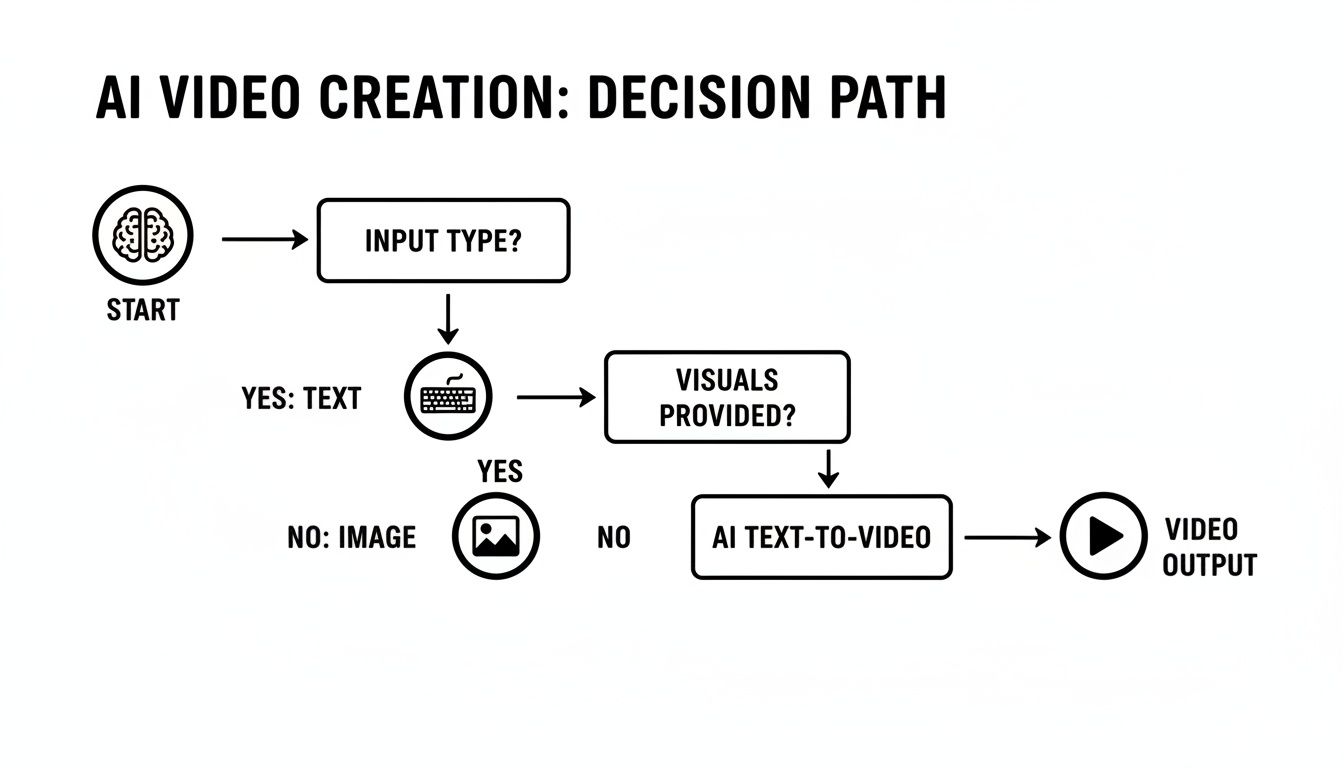
As you can see, AI essentially lets you bypass many of the complex, time-consuming steps of a traditional production pipeline.
For The Meticulous Documentary Filmmaker
Now, let's flip the script. Think about a documentary filmmaker who's deep into a feature-length project that will take months to complete. Their workflow is the complete opposite of the social media manager's. They're juggling hours of raw footage, intricate interview setups, and the need for absolute control over the narrative and cinematic feel.
Here, speed takes a backseat to precision and depth. For this kind of creator, DaVinci Resolve is the obvious front-runner. Its world-class color grading suite is critical for setting a consistent, evocative mood across the entire film. Plus, the integrated Fairlight audio tools give them everything they need for professional sound mixing and cleanup—something you absolutely need for interview-heavy work.
For a documentarian, an AI generator would be a neat side tool—maybe for creating some abstract B-roll or concept art. But the real work of assembling the film demands the kind of powerhouse, all-in-one environment that DaVinci Resolve offers. It's built for the meticulous control long-form storytelling requires.
For The Modern YouTuber And Content Creator
YouTubers often live somewhere in the middle of these two extremes. They need more editing firepower than a simple phone app can offer, but their workflow has to be faster and more intuitive than a full-blown professional suite. Their success hinges on putting out great-looking content consistently, without getting bogged down in a single video for weeks.
A hybrid approach usually works best here. A creator might use a friendly editor like Filmora for its clean timeline, handy templates for intros, and quick export settings optimized for YouTube. It hits that sweet spot of control and simplicity for vlogs, tutorials, or reviews.
At the same time, they can pull in Auralume AI to generate unique channel graphics, animate their static logo, or create custom B-roll that makes their videos pop. This combination lets them keep a steady publishing rhythm while punching well above their weight in production value.
For The Creative Agency And Illustrator
Creative agencies and illustrators have their own unique hurdle: they need to visualize and pitch concepts to clients quickly and convincingly. An illustrator wants to bring their static art to life, and an agency needs to build a compelling storyboard or animatic to land a new project.
In this world, rapid prototyping is king. This is where a tool like Auralume AI becomes a secret weapon. An illustrator can upload their art, use the image-to-video function, and add subtle motion, turning a flat drawing into something dynamic and engaging.
An agency can generate a half-dozen video concepts from a client's brief in a single afternoon. This means they can show clients actual visual ideas instead of just handing them a script or a mood board. It's a massive improvement for communication and getting that all-important client buy-in, saving tons of time and money before a full production ever kicks off.
A Practical Look at Software Pricing and Market Trends

Looking at the price tag is just the first step. The real cost of any video software is deeply connected to how you actually use it, so finding the right fit for your workflow and budget is essential. The video production software world generally sticks to a few different models, and each one has its own set of advantages and headaches depending on how often you're creating.
Picking the wrong structure can seriously mess with your return on investment. What saves a freelancer a bundle could easily become a bottleneck for a big agency, and the reverse is just as true.
Breaking Down the Common Pricing Structures
Let's dive into the three main models you'll run into. Each one is really built for a different kind of user, from the hardcore professional to someone who just needs to spin up a video every now and then.
-
One-Time Purchase: This is the old-school model. Think of tools like Apple's Final Cut Pro, where you pay a single, large fee upfront. You own that version of the software for life, which is great if you hate monthly bills. The catch? You'll likely have to pay again for major version upgrades down the road.
-
Subscription Model: Adobe Creative Cloud really set the standard here. You pay a monthly or annual fee for constant access to the latest and greatest versions, plus support and cloud perks. It’s perfect for professionals who live in the software every day and need those constant updates, but the costs definitely add up over time.
-
Pay-As-You-Go (Consumption-Based): This model feels tailor-made for the AI boom. Platforms like Auralume AI use a credit system, so you only pay for what you actually use—like generating a specific video clip. With credits that don't expire, it's an incredibly efficient way to manage costs, especially if your project schedule is all over the place.
The best model isn't just about the lowest price; it's about what aligns with your production volume. Subscriptions make sense for consistent, high-volume users. Pay-as-you-go, on the other hand, offers far better value for anyone doing variable or project-based work.
What's Happening in the Broader Market
Beyond just how you pay, it helps to know where the industry is heading. There’s a massive shift toward cloud-based tools that allow for more flexibility and collaboration, which is why subscription and consumption models are becoming so common.
North America is a huge player here. In 2023, the region led the AI video editing scene with a 35.9% market share and also held 39.3% of the entire creative software market. This dominance comes from media giants and the insatiable appetite of streaming services, making the continent a major trendsetter. You can dig into more of the numbers in this comprehensive industry report.
Making the Right Call for Your Wallet
To pick the right plan, you need to map out the total cost against what you produce. An agency churning out dozens of videos a month will probably find an Adobe subscription to be a smart, predictable expense.
But a social media manager who needs to create five ad variations one week and then nothing for the next two? They'd get a lot more mileage out of Auralume AI's pay-as-you-go system. It cuts out the waste of paying for a subscription during downtime. The goal is to find a pricing model that grows with you and always delivers a solid return on your investment.
Frequently Asked Questions About Video Production Software
Diving into the world of video production software can feel overwhelming, and it's natural to have questions. Whether you're trying to decide between a classic editor and a newer AI tool, getting good answers is key to picking the right platform. Here, we'll tackle some of the most common questions we hear from creators.
Think of this as a straightforward guide to cut through the jargon and help you make a final call in this big video production software comparison.
What Is The Best Video Production Software For Beginners?
When you're just starting out, you want software that feels intuitive and guides you toward a polished final product without a steep learning curve. Tools like CapCut are fantastic for whipping up quick social media videos, but for a true beginner, an AI-native platform like Auralume AI can be a game-changer. It basically removes the technical barrier altogether.
Instead of figuring out a complex timeline, you just start with an idea. Its Prompt Wizard walks you through crafting the right text or image prompts to get professional-looking video. This opens up high-quality video creation to anyone, even if you’ve never touched an editing tool before.
Can AI Completely Replace Traditional Video Editors?
Not just yet, but the relationship is definitely changing. Right now, AI is incredible for generating video clips from scratch, bringing static images to life, and automating tedious tasks that used to burn hours of time. That makes it a powerhouse for brainstorming and creating assets quickly.
But for the kind of granular, frame-by-frame control needed for a feature film or a complex documentary, nothing beats a traditional editor like Premiere Pro. The best approach is often a hybrid one: use AI to rapidly generate concepts and B-roll, then bring those assets into a traditional editor for the final, detailed assembly.
A smart workflow uses AI for speed and creativity at the front end of a project, and a traditional editor for precision and control at the back end. It's not about replacement; it's about enhancement.
How Do I Choose Between Subscription And Pay As You Go?
This really boils down to how often you're creating videos. If you're a professional who lives in the software every day, a monthly subscription like Adobe's Creative Cloud makes a lot of sense. The predictable cost is great for high-volume work.
On the other hand, if you're a freelancer, marketer, or run a small business where projects come in waves, a pay-as-you-go model is much more practical and cost-effective. A platform like Auralume AI, with its non-expiring credits, means you only pay for what you actually generate. You're never wasting money during those inevitable quiet weeks.
What Are The Main Limitations Of Current AI Video Generators?
AI video technology is moving at an incredible speed, but it's not perfect. Some of the common hurdles you'll see are models struggling to keep a character's appearance perfectly consistent from one clip to the next. They can also have trouble with tricky details like hand gestures or generating readable text directly within a video.
The good news is that the tech is getting better all the time. Platforms that bring together several top-tier models, like Auralume AI, give you the freedom to switch between different AI engines. This lets you pick the best model for the specific shot you're trying to create, giving you a smart way to work around some of these current limitations.
Ready to see how fast you can turn an idea into a cinematic video? Explore Auralume AI and experience the future of video creation firsthand. Start generating for free today.