
AI Video Generator From Text The Ultimate Guide to Creating Viral Clips
At its core, an AI video generator from text is exactly what it sounds like: a tool that spins video clips into existence from nothing more than a written description. You don't need a camera, a crew, or a fancy editing suite. You just type what you want to see—say, "a golden retriever chasing a frisbee in a sunny park"—and the AI brings that scene to life.
This technology is fundamentally changing who can create videos, making the process faster, more affordable, and open to anyone, no matter their technical background.
The New Era of AI Video Generation From Text
Imagine you could direct a film just by writing out your ideas. That's no longer science fiction; it's the reality we're stepping into. We're in the middle of a massive shift, moving away from the painstaking, expensive process of traditional video production toward the simple, immediate world of AI creation.
For years, making even a short, high-quality video was a marathon. It meant storyboarding, scouting locations, hauling expensive gear, filming, and then spending countless hours hunched over an editing desk. Every single step demanded specialized skills and a hefty budget, which kept professional video production locked away for most people.
That old way of doing things built a massive wall, limiting visual storytelling to those who had the resources.
Today, that wall is coming down. An AI video generator from text is like having an entire production studio on your laptop, ready to turn your thoughts into moving pictures. This isn't just some novelty for tech geeks; it's rapidly becoming a go-to tool for marketers, artists, and creators everywhere.
What we're seeing is the genuine democratization of creativity. Anyone with a good idea can now create stunning visuals without needing to learn complicated software or buy pricey equipment. This opens up a whole new world of possibilities.
The ability to generate video from a simple text prompt means that brainstorming, prototyping, and content creation can happen at the speed of thought. What once took weeks of planning and execution can now be visualized in minutes.
To really get a sense of how big this is, it helps to look at the broader ecosystem of the best AI tools for content creators, where video generation is just one piece of the puzzle. The impact is huge. A social media manager can churn out a dozen different ad concepts in a single afternoon. A filmmaker can storyboard an entire scene visually before ever picking up a camera. A teacher can create dynamic visuals for a lesson on the fly.
This all points to a massive change in focus. Video creation is no longer a purely technical, production-heavy task. It's becoming an idea-centric one. The most important skill is no longer your ability to operate the equipment, but your ability to imagine and clearly describe the story you want to tell.
How an AI Turns Your Words Into Video
It feels like magic, but what's happening under the hood of an AI video generator from text is all about incredibly smart technology, not smoke and mirrors. The best way to think about it is like hiring a brilliant artist who has spent a lifetime studying millions of videos and images. You give them a description, and they paint a completely new masterpiece just for you.
When you type in a prompt and hit "Generate," the AI immediately gets to work. It doesn't see "a dog chasing a ball" in the same way a person does. Instead, it deconstructs your sentence into a mathematical format it can process, pinpointing the key subjects, actions, and stylistic details.
This first step is all about interpretation. The AI uses sophisticated models to understand the relationships between concepts—like knowing a "queen" is associated with a "throne" or a "castle." It has to nail the what and the how of your idea before it can even think about creating a single frame. This process is catching on fast; the AI video generator market is booming, growing from USD 534.4 million to a projected USD 2,562.9 million by 2032. That’s a staggering 19.5% annual growth rate, a trend you can explore further over at ArtSmart AI.
From Digital Static to a Moving Scene
Once the AI understands your prompt, the real fun begins. This is where a technique, often built around something called a diffusion model, takes over. Picture the AI starting with a screen full of random digital noise—pure static, like an old TV with no signal.
From that chaos, the AI begins to sculpt. Guided by your text prompt, it meticulously refines the static in thousands of tiny steps. It’s like a sculptor who starts with a raw block of marble and slowly, carefully chips away until a recognizable form emerges.
At every single step, the model is essentially asking itself, "Does this look more like 'a futuristic car driving through a neon-lit city at night'?" It makes countless adjustments, shifting pixels and refining movement until the noise resolves into a clear, coherent video that matches what you asked for.
This isn't about grabbing existing clips and piecing them together. The AI is truly generating something brand new, from the ground up.
This chart shows just how much the creative process has changed, moving from the old, manual way of doing things to a simple, AI-powered workflow.
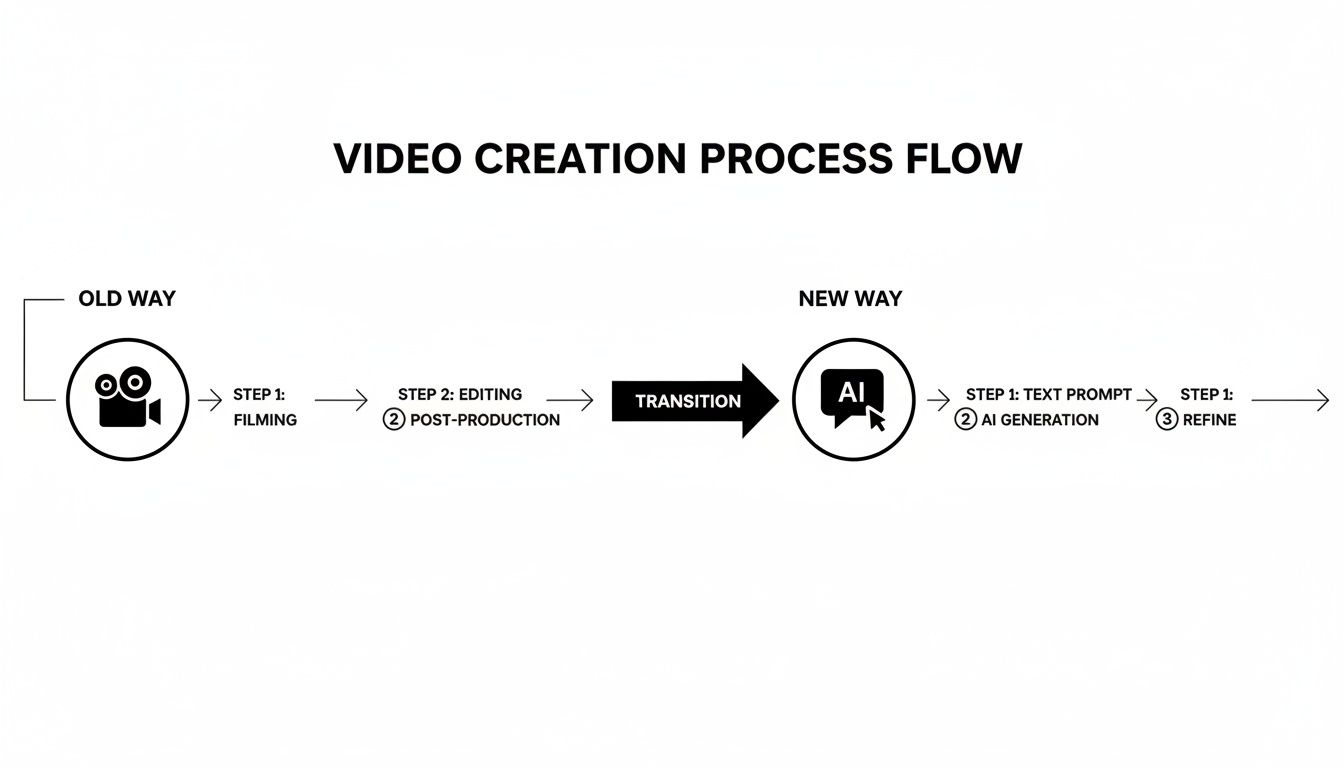
As you can see, it takes a complex, resource-heavy production cycle and boils it down to a few straightforward stages that start with your idea.
The Power of a Good Education (For an AI)
So, how does the AI know what a "sunny park" or a "cyberpunk aesthetic" even looks like? It learns the same way we do: by studying. In this case, it’s been trained on an enormous dataset of billions of images and videos, each paired with a text description. Think of it as the AI’s art school and film history class all rolled into one.
During its training, the model builds connections between words and visual elements. It learns that "golden hour" is associated with warm, soft light and long shadows. It figures out that "cinematic" often means specific camera angles, shallow depth of field, and particular color palettes.
This massive library of visual knowledge becomes the AI's creative toolbox. The better and more diverse the data it was trained on, the more nuanced, accurate, and compelling its video creations will be. This training isn't a one-and-done deal, either. These models are constantly being updated, which is why the quality of AI video is improving at such a mind-blowing speed.
What This Means for Your Brand
Bringing an AI video generator from text into your workflow isn’t just about adding another tool to the box. It’s a fundamental change to what your brand can achieve. This is more than just making videos faster; it's about seizing opportunities that were previously blocked by the usual walls of time, money, and manpower.
This isn't some far-off future, either. The shift is happening right now. Most content creators have already woven generative AI into their process for one simple reason: it works. A recent Digiday creator trends report found that 78.8% of AI video creators say reduced production time is the single biggest win, while 44.1% pointed to massive cost savings. With nearly half (49%) of all marketers now using AI to create video, the trend is clear.
The real advantages can be boiled down to four game-changing pillars. Let's dig into what each one looks like in the real world.
Radical Speed From Concept to Campaign
Let's be honest: traditional video production is slow. Painfully slow. A single commercial can easily chew up weeks or months moving from script to storyboard, then to shooting and all the post-production work. An AI video generator takes that entire timeline and crushes it down to minutes.
Picture your marketing team gearing up for a new product launch. Instead of spending a week debating a single ad concept, they can now generate ten completely different video treatments in an afternoon. This makes A/B testing a breeze, letting you see what actually connects with your audience before you put serious money behind it.
This kind of speed means you can finally react to market trends, breaking news, or a competitor's move almost instantly. What used to be a long, drawn-out production cycle now happens at the speed of an idea.
Dramatic Cost Reduction
The price tag on high-quality video has always been a major hurdle. A professional commercial can easily cost five or six figures once you factor in the crew, gear, locations, talent, and editors. For many businesses, that makes consistent video content a complete non-starter.
An AI video generator from text flips that entire economic model on its head. All the costs tied to a physical production? Gone.
Instead of paying for a full production crew, you’re looking at a predictable, low-cost subscription. This isn't just a minor saving; it's a fundamental change that democratizes access to professional-grade video content for brands of all sizes.
This financial freedom lets you move your budget from just making the content to actually promoting it, distributing it, and focusing on growth.
Effortless Scalability for Modern Marketing
In a world of a dozen different social platforms, one-size-fits-all content just doesn't cut it. You need video tailored for different platforms, different audiences, and even different languages. Trying to create all those variations by hand is a logistical nightmare and often way too expensive, especially when building out a comprehensive strategy for AI for social media marketing.
With AI, scalability is part of the package. You can take one core idea and instantly spin up versions for any format—from a wide 16:9 for YouTube to a vertical 9:16 for TikTok and Reels. You can just as easily generate variations with different visual styles, calls-to-action, or even translate it into multiple languages, all from that first prompt.
Tools like Auralume AI bring multiple models together, giving you the stylistic flexibility to match any platform's vibe. This lets your brand stay present and engaging everywhere without a massive increase in work or budget.
Limitless Creative Exploration
Finally, and maybe most excitingly, AI removes the creative guardrails. Concepts that were once the exclusive domain of Hollywood VFX studios with nine-figure budgets—a spaceship landing in ancient Rome, a forest made of glowing crystals—are now within reach.
AI makes the impossible possible. The only real limit is your ability to describe what you see in your head.
This opens up a whole new world for brand storytelling. You can create surreal, abstract, or fantastical visuals that grab attention and refuse to let go. You can bring complex data to life, build stunning product animations, or invent entire worlds from scratch, giving your brand a creative identity that’s truly unforgettable.
Mastering the Art of Cinematic Prompting
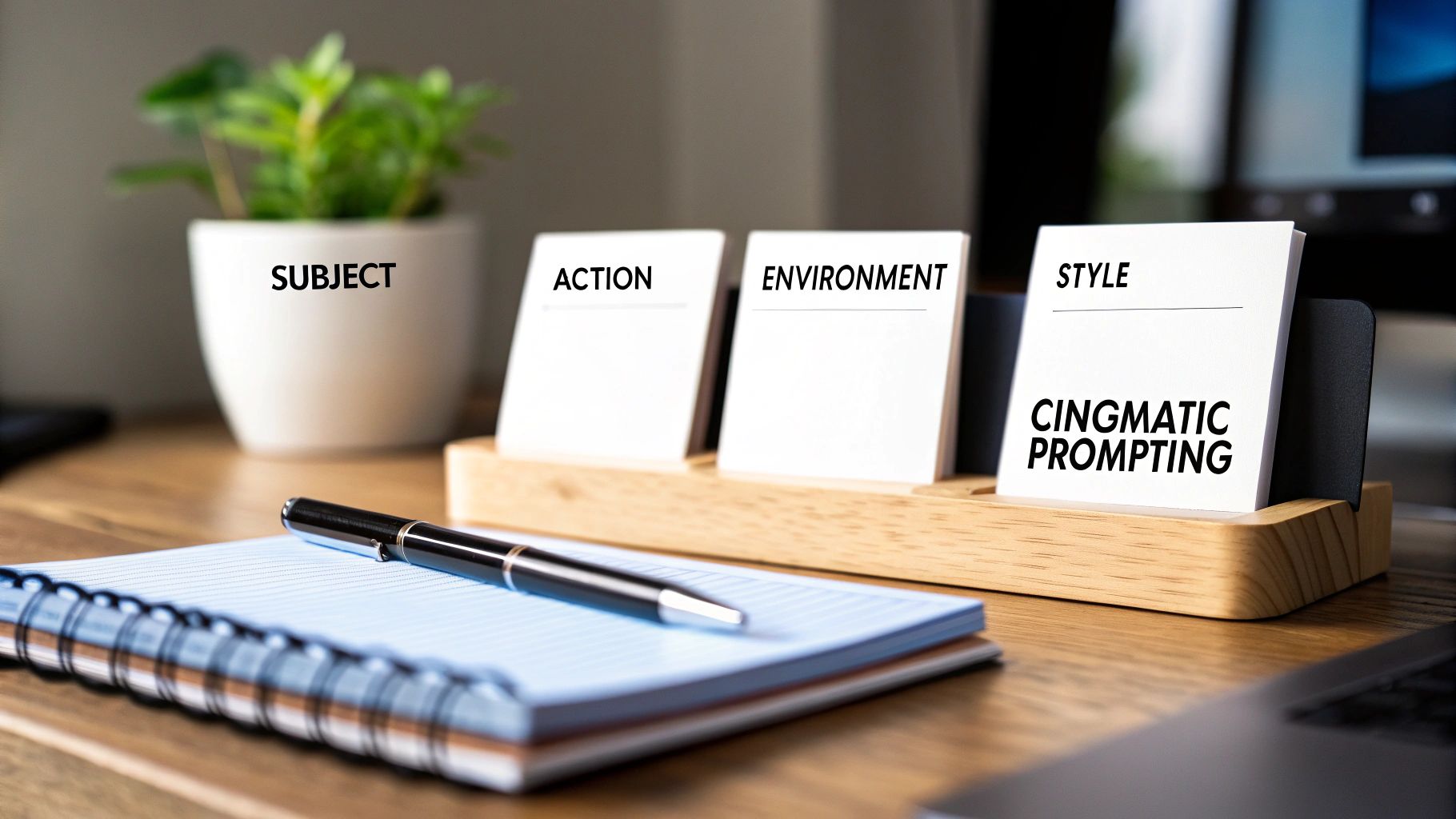
If the AI is your artist, then your prompt is the creative brief. It's that simple. The quality of the video you get back is a direct reflection of the quality of the instructions you provide, making effective prompting the single most important skill for using an AI video generator from text.
Asking for "a cat" will give you just that—a generic cat. But to create something truly breathtaking, you have to start thinking like a director.
This means you need to move beyond simple nouns and verbs and really embrace descriptive language. Your goal is to paint a vivid picture with your words, giving the AI a detailed blueprint to work from. Every adjective, adverb, and specific detail you add gives you more control, guiding the model toward the exact vision in your head.
Think of it this way: a basic prompt is a rough sketch, but a cinematic prompt is a fully rendered storyboard. It’s how you dictate the mood, lighting, camera work, and artistic style.
The Five Pillars of a Perfect Prompt
To get high-quality video consistently, it helps to have a framework in mind. A well-crafted prompt usually touches on five core elements. You won't need every single one for every video, but using them as a mental checklist ensures you don't miss any critical details.
- Subject: Who or what is the main focus? Be specific. Don't just say "a car," try "a vintage red 1960s convertible."
- Action: What is the subject doing? Evocative verbs are your best friend here. "Driving" is okay, but "cruising gracefully" or "speeding recklessly" tells a much richer story.
- Environment: Where is all this happening? Describe the surroundings. "A city street" becomes "a rain-slicked neon-lit Tokyo street at midnight."
- Style: What’s the overall aesthetic? This is where you define the look and feel. Words like "photorealistic," "anime," "cinematic," or "vintage 8mm film" are powerful commands.
- Composition: How is the shot framed? Think like a cinematographer. Specify camera angles and movements like "wide-angle shot," "drone shot tracking from above," or "extreme close-up."
By weaving these elements together, you turn a simple request into a detailed set of director's notes. This is the real secret to moving from basic clips to polished, cinematic work.
Layering in Detail for Cinematic Control
Let's put this framework into practice. The real magic happens when you start layering in descriptive language—powerful adjectives and evocative adverbs—to control the finer points of the scene. You’re not just telling the AI what to create, but how it should feel.
Take a simple prompt: "A knight walks through a forest."
It’s functional, sure, but it leaves almost everything up to the AI's imagination. You might get a bright, sunny day or a dark, spooky night. The knight could be old or young, the armor shiny or rusted. To get control back, we need to add layers of detail.
A great prompt removes ambiguity. It gives the AI specific visual and emotional cues, ensuring the final video aligns with your creative intent rather than the model's default interpretation.
Let's see how we can build on that basic idea and turn it into something far more compelling by adding details about the environment, the subject, the mood, and the camera work.
Prompt Crafting From Basic to Cinematic
The table below breaks down how you can systematically build a prompt from a simple idea into a detailed, cinematic instruction. Each element you add gives the AI more specific direction, resulting in a video that's much closer to your original vision.
| Prompt Element | Basic Prompt Example | Cinematic Prompt Example | Why It Works |
|---|---|---|---|
| Subject | A knight | An ancient knight in battle-scarred, moss-covered armor | Adds character, age, and history to the subject. |
| Action | walks | trudges wearily, carrying a glowing sword | Changes a neutral action to one with emotion and purpose. |
| Environment | through a forest | through a mystical, fog-shrouded forest at dusk | Establishes a specific mood, time of day, and atmosphere. |
| Style | (None) | illuminated by ethereal god rays, cinematic, photorealistic style | Dictates lighting, realism, and the overall aesthetic. |
| Composition | (None) | low-angle tracking shot | Defines the camera's position and movement for a dynamic feel. |
By layering these details, you provide a rich, multi-sensory brief that leaves little to chance.
From Basic to Breathtaking: A Prompt Example
Now, let's pull all those pieces together to see the final comparison. We’re rebuilding our prompt from the ground up using our five pillars and descriptive language.
-
Basic Prompt: "A knight walks through a forest."
-
Cinematic Prompt: "An ancient knight in battle-scarred, moss-covered armor, carrying a glowing sword, trudges wearily through a mystical, fog-shrouded forest at dusk. The scene is illuminated by ethereal god rays piercing through the dense canopy. Cinematic, photorealistic style, low-angle tracking shot."
See the difference? We didn't just add words; we added a story. The AI now has specific instructions for the knight's condition ("battle-scarred," "wearily"), the forest's atmosphere ("mystical," "fog-shrouded"), the lighting ("ethereal god rays"), and even the camera movement ("low-angle tracking shot").
This level of detail is what separates a generic clip from a scene that feels alive and intentional. By thinking like a director and providing a rich brief, you empower the AI video generator from text to execute your vision. This is your playbook for turning simple ideas into stunning visual narratives.
A Step-By-Step Guide to Your First AI Video

All the theory is great, but the real magic happens when you create your first video. This guide will walk you through the whole process, from a simple idea to a finished video clip. We’ll use the Auralume AI platform for this walkthrough since its clean interface is a great starting point for anyone new to this.
The path from a blank text box to a downloadable MP4 is much simpler than you might think. Follow along, and you’ll see just how powerful an AI video generator from text can be. Let's dive in.
Step 1: Pick a Platform and Sign Up
First things first, you need a tool. Head over to a platform like Auralume AI and create an account, which is usually just a quick email and password setup. The whole thing should take you less than a minute.
Once you’re logged in, just take a second to get your bearings. Find the main text box where you'll type your prompt, see where you can select different AI models, and check your credit balance.
Step 2: Write (and Rewrite) Your Prompt
This is where your creativity comes into play. Based on the cinematic prompting tips we covered, start writing a clear description of the video you have in your head. Don't stress about making it perfect on the first go—refining your prompt is a huge part of the process.
Let's work with a concrete example:
Prompt: "A majestic golden eagle soaring through a dramatic mountain valley at sunrise, golden light catching its wings. Cinematic, photorealistic, 4K, slow-motion tracking shot from the side."
Notice how this prompt gives the AI everything it needs: a subject (golden eagle), an action (soaring), a setting (mountain valley at sunrise), a style (cinematic, photorealistic), and even camera direction (slow-motion tracking shot). This level of detail is what produces great results.
Step 3: Choose the Right AI Model
Not all AI models are created equal; they're often trained for different visual styles. A good platform will give you a menu of options, with some models being fantastic at realism while others are geared toward animation or more abstract art.
For our eagle prompt, a model built for photorealism is the obvious choice. But if you were trying to make an animated explainer, you'd pick a completely different one. Matching the model to your vision is a key step.
Step 4: Generate and See What Happens
With your prompt ready and your model selected, it's time for the fun part: hit "Generate." The AI now gets to work, interpreting your words and building a video frame by frame. Depending on how complex your request is and how busy the servers are, this can take anywhere from a few seconds to a couple of minutes.
Once it’s done, take a good look at what it produced.
- Is the movement smooth and believable?
- Does the video have the mood you were aiming for?
- Are there any weird visual glitches or artifacts?
If it's not quite what you wanted, no worries. That’s what the next step is for.
Step 5: Tweak and Download
The best results almost always come after a little tweaking. Go back to your prompt and make small changes. Maybe you want to adjust the lighting from "sunrise" to "golden hour," or change the camera angle to a "drone shot from above." Small adjustments can lead to big improvements.
After a few tries, you’ll land on a version you love. Most tools offer an option to upscale the video to a higher resolution, making it look even sharper. When you’re happy with the final cut, just click the "Download" button. The MP4 file will save directly to your computer, ready for you to use and share.
Navigating the Future of AI Video Responsibly
The creative doors that AI video generators from text are blowing open are incredible, but we have to remember this technology is still in its early days. It’s like stepping into a new frontier—you need a good map that shows not just the opportunities, but also the current limitations and ethical questions that come with the territory.
This tech is moving at a breakneck pace, but it's far from perfect. As you start creating, you’ll probably bump into a few common technical hurdles that even the most sophisticated models are still trying to figure out.
Understanding Current Technical Hurdles
Right now, one of the biggest challenges is motion consistency. An AI might nail the first frame, creating a beautiful, detailed image, but then struggle to keep that logic going as things start to move. You might see a person's hand subtly warp as they wave, or an object in the background might inexplicably change shape.
Another frequent problem is what we call artifacting. These are the weird little visual glitches that pop up in a video. They can look like shimmering textures, blurry faces in a crowd, or objects that defy the laws of physics. They're often small, but they can be just enough to shatter the illusion.
Here are a few ways to get around these growing pains:
- Keep your clips short. You'll often get much cleaner, more stable results by generating videos in 3-5 second chunks and then stitching them together in an editor.
- Stick to simpler movements. A prompt describing a slow pan across a landscape is far more likely to succeed than one with fast-paced, complex action between characters.
- Iterate, iterate, iterate. Don’t love the first take? Don't be afraid to regenerate it or tweak your prompt slightly. Sometimes a tiny adjustment is all it takes to get the shot you want.
The Big Questions: Ethics and Ownership
Beyond the tech specs, AI video forces us to wrestle with some heavy ethical and legal questions. As creators, we have a responsibility to use these powerful tools with our eyes wide open.
The most immediate question is about copyright and ownership. If an AI helps you create a video, who actually owns it? The legal answers are still being hammered out, but generally, most platforms give you a license to use what you create, especially if you’re on a paid plan. Still, you absolutely have to read the terms of service for any tool you use.
The rapid development of AI video tools is outpacing the legal frameworks designed to govern them. This creates a gray area where creators must prioritize ethical use and stay informed about evolving regulations.
Then there’s the elephant in the room: misuse. We’re talking about deepfakes and the spread of misinformation. The same tool that helps you create a beautiful marketing video could, in the wrong hands, be used to make a fake but convincing video to deceive people. Good platforms are already building in safeguards like watermarking AI content and blocking prompts that could lead to harmful imagery.
A Glimpse Into What Comes Next
The future for text-to-video AI is incredibly bright. The progress we’re seeing is set to solve today’s headaches and open up entirely new creative avenues. We're on the verge of some seriously cool breakthroughs.
Soon, we can expect to see real-time generation. Imagine typing a prompt and watching the video come to life instantly, allowing you to tweak a scene’s lighting or a character’s mood on the fly. It would turn video creation into a live, interactive jam session.
These tools are also on track to become a standard part of the professional filmmaking toolkit. AI could become a kind of "assistant director," helping with storyboarding, generating complex special effects, or even creating entire animated films from a script. The point isn’t to replace human artists, but to give them a powerful new collaborator that makes even the most ambitious visions possible.
Frequently Asked Questions
Jumping into any new creative tool like an AI video generator from text always comes with a few questions. Let's tackle some of the most common ones we hear from creators.
How Long Can AI Videos Be?
Right now, the sweet spot for AI-generated video is short-form content. Most models are built to produce high-quality clips that are typically between 3 and 15 seconds long. The main reason for this is that keeping everything looking consistent and fluid over a longer runtime is still a massive technical hurdle for the AI.
If you need something longer, the go-to strategy is to think like an editor. Generate a series of short, cohesive clips based on your idea, and then stitch them together using any standard video editing software. This method actually gives you more creative control and helps maintain a high-quality look from start to finish.
Who Owns the Copyright to AI-Generated Videos?
This is a big one, and the legal ground is still shifting. For the most part, the platform's terms of service are your guide. Reputable AI video generators, especially on their paid plans, usually grant you a commercial license, meaning you’re free to use the videos you make.
That said, you should always, always read the fine print. Before you use a clip in a marketing campaign or on social media, double-check the tool's specific terms and conditions to be sure you know exactly what your usage rights are.
What Is the Quality of AI-Generated Videos?
The quality has come a long way in a very short time. Many of the top platforms can now pump out crisp, high-resolution videos in 1080p or even 4K. The final result really hinges on a few things: the power of the AI model itself, how well you write your prompt, and whether you take advantage of features like upscaling.
You might still spot a few minor glitches or weird motions here and there, but the output is more than good enough for professional work, especially for things like social media ads, B-roll, and marketing content.
Ready to stop imagining and start creating? Auralume AI brings together the world's best video generation models in one simple platform. Turn your text into cinematic magic in seconds. Start creating for free at https://auralumeai.com.