
MiniMax H3 Image: What the New 4K Open-Weight Model Actually Offers
Last verified: November 11, 2026 (Asia/Shanghai, UTC+8). Facts below come from MiniMax's official blog, docs, pricing page, Hugging Face model card and license, plus the public posts linked in Sources. Speed, quality and price-comparison claims are vendor-reported unless marked otherwise. We have not run hands-on tests of MiniMax H3 Image.
MiniMax H3 Image is MiniMax's new open-weight image generation and editing model, built on the H3 family and aimed at native 4K output. The official research post, dated November 11, 2026 on the page itself, calls the release "Bringing 4K Image Generation into the 10-Second Era" and says the model supports text-to-image, reference-based generation, and image editing, including up to 16 reference images (MiniMax). The company's model release notes list it under November 10, 2026, and the verified @MiniMax_AI account announced it at 15:40 UTC that day (23:40 Asia/Shanghai).
The name is easy to mix up. MiniMax H3 Image (API IDs MiniMax-H3-Image and MiniMax-H3-Image-Highspeed) is a still-image model. MiniMax H3 is the earlier multimodal video model from July 31, 2026. Hailuo AI is one official app where MiniMax says you can use H3 Image; it is not the model. This guide sticks to the image model: what it is, where it runs, what it costs, what the license actually allows, and what early public testers have said.
| At a glance | MiniMax H3 Image |
|---|---|
| What it is | Open-weight text-to-image and image-editing model in the H3 family |
| Official announcement | X post, November 10, 2026, 15:40 UTC; research blog (page date November 11, 2026) |
| API model IDs | MiniMax-H3-Image (Standard), MiniMax-H3-Image-Highspeed |
| Vendor speed claim | A 4K (4096 × 4096) image "in under 10 seconds" (blog) |
| Default / max output | API default area tier is 4K; custom area from 655,360 to 20,000,000 pixels (guide) |
| Reference images | 1 to 16 on the image-edit endpoint |
| Open weights | MiniMaxAI/MiniMax-H3-Image under the Community License (territorial and commercial limits apply) |
| Launch-week 4K discount | 50% off the total request cost when the delivered image is at least 16,600,000 pixels, until November 17, 2026, 16:00 UTC exclusive (pricing) |
Practical rule: treat MiniMax H3 Image and MiniMax H3 as different products. One makes stills, the other makes video. A page that only says "H3" is not enough.
What MiniMax H3 Image is
MiniMax describes H3 Image as an open-weight model "built on H3" for text-to-image, reference-based generation, and editing (blog). The Hugging Face model card adds that generation and editing share one checkpoint: a text prompt alone is text-to-image; one or more reference images plus a prompt is an edit.
The same card is specific about how the model is built:
- The diffusion transformer has 33.1 billion parameters and uses the H3 architecture with the audio layers removed.
- It reuses the MiniMax-H3 Qwen3-VL text encoder unchanged (a separate ~66.7 GB download if you already have H3).
- The image checkpoint is listed at 68.65 GB in BF16 for the DiT, plus a 2.34 GB VAE and small sampling heads.
- The checkpoint is distilled to 6 sampling steps (6 NFEs) with no classifier-free guidance. Local serving docs say other step counts or guidance values return HTTP 400, and negative prompts are not supported.
MiniMax's pitch is that those choices make ~16-megapixel images practical. The model card says it generates about 16 MP at every listed aspect ratio "directly and without an upscaler," from 4096×4096 (1:1) to 6272×2688 (21:9), and that results are generally best around 16 MP, with an effective working range of about 4 MP to 20 MP.
On quality and prompt following, the official language is qualitative. The blog says H3 Image produces "rich, natural details without the overly smooth, artificial look often associated with AI-generated images," and that it "delivers state-of-the-art prompt adherence among open-weight models." Those are vendor claims. MiniMax has not, in the pages we checked, published a named, numbered public leaderboard that would let you read a head-to-head score off the announcement.
Availability and pricing
H3 Image is available in more than one form, and the right one depends on whether you want an API, a consumer app, or local weights.
Official channels listed on the blog and model card:
- API: MiniMax API Platform, global
https://api.minimax.io, Chinahttps://api.minimax.cn - Apps: MiniMax Code (code.minimax.io); Hailuo AI web (global hailuoai.video, China hailuoai.com); desktop agents (global agent.minimax.io, China agent.minimax.cn)
- Weights: Hugging Face, with deployment notes for SGLang, vLLM-Omni, diffusers, and ComfyUI
After launch, @MiniMax_AI also thanked fal and Runware for day-zero support (those posts went up at 11:42–11:43 Asia/Shanghai on November 11, 2026). That is MiniMax stating partner availability, not a test we ran.
Pay-as-you-go API pricing is billed in tokens, in USD (pricing overview):
| Model | Input text ($ / M tokens) | Input image ($ / M tokens) | Output image ($ / M tokens) |
|---|---|---|---|
| MiniMax-H3-Image (Standard) | $2.30 | $1.50 | $3.80 |
| MiniMax-H3-Image-Highspeed | $2.30 | $3.00 | $7.60 |
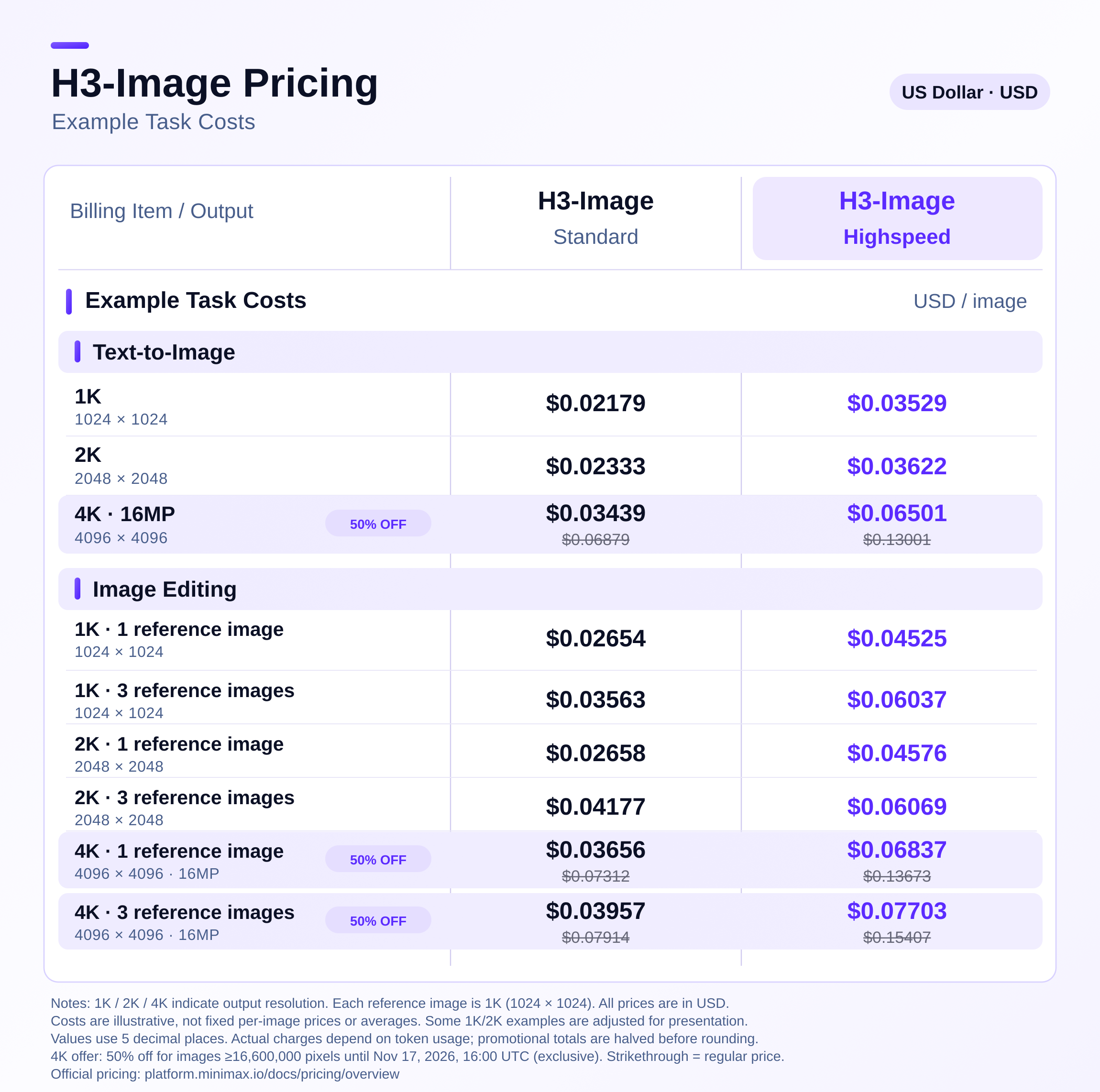
MiniMax also publishes example per-image totals and warns that even at the same resolution, the real bill can change with the number of text tokens, including tokens added by prompt enhancement:
| Task (vendor examples) | Standard | Highspeed |
|---|---|---|
| Text-to-image, 1K (1024×1024) | $0.02179 | $0.03529 |
| Text-to-image, 2K (2048×2048) | $0.02333 | $0.03622 |
| Text-to-image, 4K (4096×4096) | $0.06879, or $0.03439 during the 4K promotion | $0.13001, or $0.06501 during the 4K promotion |
| Image edit, 1 × 1K reference → 1K | $0.02654 | $0.04525 |
| Image edit, 1 × 1K reference → 4K | $0.07312, or $0.03656 during the 4K promotion | $0.13673, or $0.06837 during the 4K promotion |
The 4K promotion is time-boxed. From the pricing page: through November 17, 2026, 16:00 UTC exclusive (that is November 18, 2026, 00:00 Asia/Shanghai), MiniMax is offering 50% off the total request cost for both Standard and Highspeed when the final delivered image has at least 16,600,000 pixels. The standalone H3-Image-Context-IR prompt-enhancement call is listed at $2.30 per million input tokens. MiniMax's M Plan includes H3 Image on Go, Explore, and Build; Highspeed is listed on Explore and Build.
The blog's relative claim — "Pricing is 50–70% of comparable mainstream offerings" — does not name those offerings in the article text. Use the dollar table above, not the percentage, when you budget.
Practical rule: the 4K discount is on delivered pixel count, and it ends at 16:00 UTC on November 17, 2026. Recheck the pricing page before you assume the promotional number still applies.
Specs that actually constrain a workflow
The image generation guide is more useful than the launch headline once you are calling the API.
Endpoints. Text-to-image is POST /v1/images/generations. Edits are POST /v1/images/edits, with 1–16 reference images. Both are synchronous; streaming is optional and returns each image as it finishes. The server may wait up to 600 seconds, and MiniMax warns that the endpoints are not idempotent: a timeout or automatic retry can generate and bill again. The docs recommend setting the client timeout to at least 600 seconds and turning off automatic retries (including max_retries=0 in the OpenAI SDK).
Size. You can set an aspect ratio plus an area tier (1K, 2K, or 4K, default 4K), or an exact WIDTHxHEIGHT. Mixing an explicit pixel size with aspect_ratio or area returns 400. The area must be between 655,360 and 20,000,000 pixels, and the aspect ratio between 1:3 and 3:1. Common 16 MP sizes in the model card include 4096×4096, 4736×3552, 5024×3360, 5472×3072, and 6272×2688.
Prompts and references. A prompt can be up to 32,000 characters. If you disable prompt enhancement on text-to-image, only about the first 4,096 tokens take effect, and you must supply a width/height or a fixed X:Y aspect ratio. Image edits always run prompt enhancement. Reference images may be JPG, JPEG, PNG, WEBP, HEIC, or HEIF, up to 64 MiB each, with width/height in [128, 8192] and a long/short side ratio of at most 4:1. You can request 1–10 output images per call, as JPEG (default), PNG, or WebP.
What it does not do. The guide states that preview images, masked edits, and transparent backgrounds are not supported. If your workflow depends on inpainting masks or alpha channels, this is not a drop-in replacement.
Local serving is heavy. Besides the 68.65 GB image checkpoint, self-hosting also needs the MiniMax-H3 text encoder. Official recipes exist for SGLang, vLLM-Omni (including multi-GPU sequence parallelism), diffusers, and ComfyUI. We did not measure VRAM or latency on any of those stacks.
Official benchmarks, and what they are not
MiniMax's speed claims are the ones that will be quoted most often, so they deserve a clear label.
From the research blog:
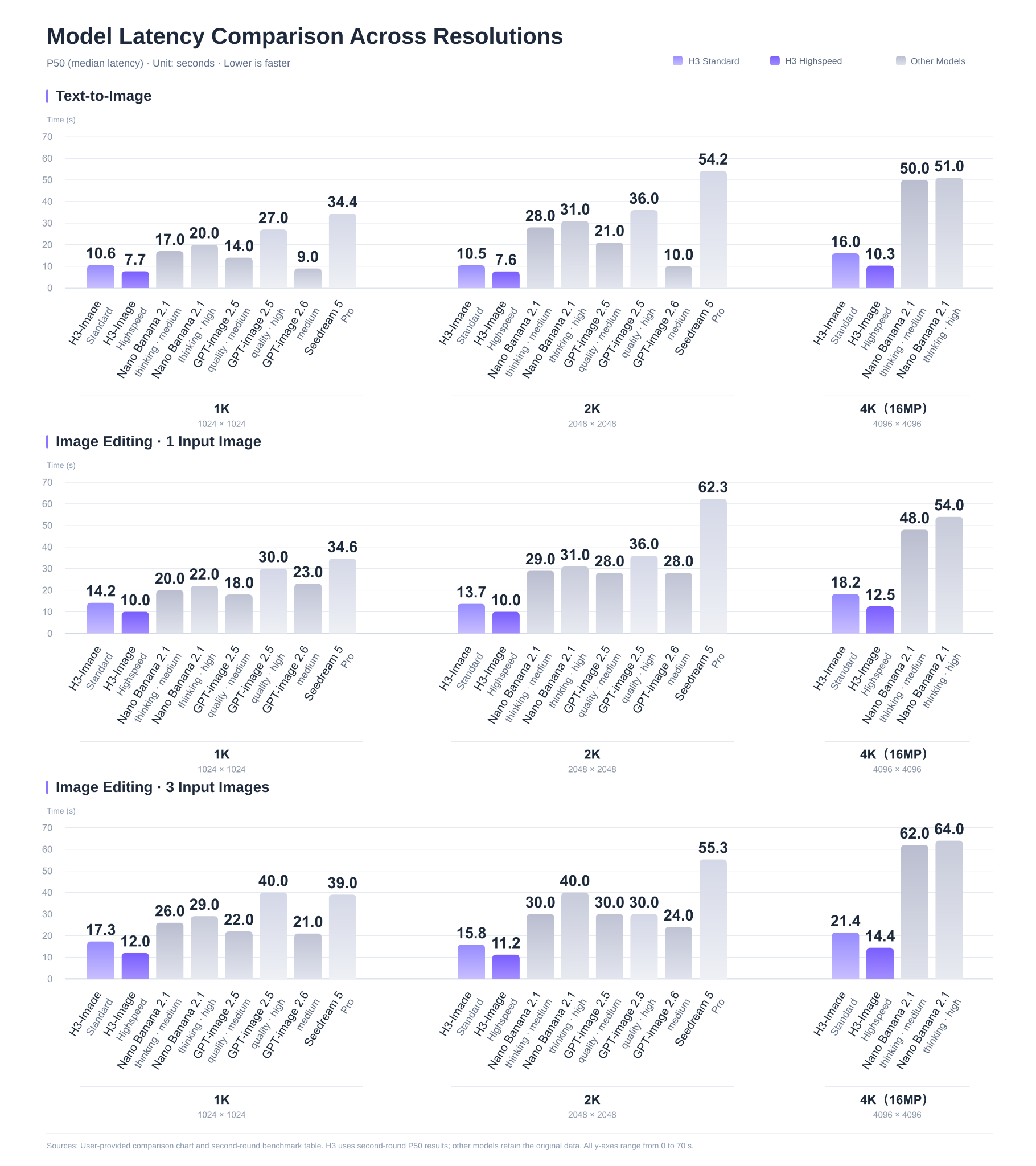
- A full-resolution 4K (4096 × 4096) image "in under 10 seconds"
- "Up to 5× the speed of mainstream alternatives"
- Standard mode "1.5–2× as fast as mainstream alternatives"; Highspeed "3–4×"
Those figures are vendor-reported. The blog text does not name the models in the comparison set, and we have not reproduced the latency chart. The official @MiniMax_AI launch post uses the same core claims: "4K image generation in 10 seconds," "16 million pixel resolution," "up to 16 reference images," and "it's open-weight."
There is no independent, agreed leaderboard in the official materials we reviewed for prompt adherence or "realism." If you need a quality verdict on your prompts, you will have to run that comparison yourself.
Practical rule: "Under 10 seconds" is MiniMax's claim for 4K, not a measurement we made, and it is not a guarantee for every size, queue, or local GPU.
Real-world reactions
Public discussion is still early. A Hacker News submission of the Hugging Face page, posted at 15:29 UTC on November 10, 2026 (23:29 Asia/Shanghai), had 4 points and no comments when we checked on November 11. That is not a meaningful community verdict; it only shows that HN was quiet on day one.
On X, testers were posting as early as November 9, 2026, often under "early access," before the official announcement. Several of those accounts also disclose creator-partnership programs, so a flashy demo is not the same thing as a controlled benchmark. A few more specific reports, quoted from posts we read:
- Mirochill wrote that early results seemed "excellent" for prompt adherence and that the model can use up to 16 reference images, but that "with a simple prompt, it has a considerable lag versus the competition" (translated from the French original).
- underwood compared the same prompt with GPT Image 2.5 and said MiniMax-H3-Image "looks a bit flatter to me."
- JSFILMZ compared it with Seedream 5.5 and wrote that MiniMax "cooked with realistic people," after using an H3 Image still as a start frame for MiniMax H3 video.
- One2x Datalab ran a three-stage makeup-removal edit against Seedream and GPT Image 2.6 and reported that H3 Image and Seedream followed the makeup edit, while GPT Image 2.6 kept the stage makeup; the author also said H3 Image "looked best in realism and lighting" in that test.
- Brent Lynch, in an early-access preview, said "Image Edit is where it's strongest in my opinion."
- Ozan Sihay described a 16-reference test that placed two people and many Turkish-text objects into one room.
ComfyUI's official blog, dated November 10, 2026, is a clearer third-party product confirmation than any single demo: the model already runs natively in ComfyUI and via Partner Nodes, with a fixed six-step sampler and no negative prompt. That matches MiniMax's own serving rules.
These are early, single-team observations. They do not settle whether H3 Image beats GPT Image, Seedream, or Flux on a typical production job.
Who should use it
API users who need native 4K and multi-reference edits. If you already bill MiniMax, or you want one model ID for both text-to-image and up-to-16-reference editing, the documented API is the most straightforward path. The 4K promotion only matters if your delivered images actually clear 16.6 MP and you ship before the cutoff.
Teams that can use the Community License. The open weights are real, but they are not a blanket MIT-style grant. The MiniMax-H3-Image Community License, dated November 10, 2026, defines the applicable territory as worldwide excluding the European Union, the United Kingdom, the Republic of Korea, and the United States. Section IV also requires prior written authorization, requested through MiniMax's license console, if you or your affiliates have annualized revenue over USD 1 million, or if you provide a hosted service to third parties. MiniMax says people in excluded territories who want to deploy the weights can contact the company about a separate license. This is a license summary, not legal advice; read the agreement before you ship a product.
ComfyUI and local-inference users with enough hardware. If you already serve MiniMax H3, you already have the text encoder. ComfyUI documents native workflows. Self-hosting still means downloading tens of gigabytes of weights and following the official 6-step, guidance-1 settings.
Who should pause. Anyone who needs mask-based inpainting or transparent backgrounds; anyone who wants a negative prompt or a tunable sampler; anyone assuming "open-weight" means unrestricted use in the US, EU, UK, or Korea; and anyone treating the "under 10 seconds" line as a service-level agreement.
How it compares, briefly
MiniMax is positioning H3 Image against "mainstream" closed image models on speed and price, and against other open-weight models on prompt adherence. It does not publish a complete official score table for those matchups in the blog post we read.
What you can say from primary sources, without inventing a winner:
- Versus typical 1K/2K APIs, the distinctive official feature is native ~16 MP output plus up to 16 references in one checkpoint, with a documented 4K discount through mid-November.
- Versus other open image checkpoints, the unusual serving contract is fixed 6 steps, no CFG, no negative prompt, and a very large text encoder shared with MiniMax H3.
- Versus MiniMax's own H3 video model, this is the still-image counterpart, not an upgrade of the video API.
- Early user comparisons with GPT Image 2.5/2.6 and Seedream 5.5 are already mixed: some testers prefer H3 Image on multi-reference edits and people; others found simple-prompt quality or "flatness" behind a rival. None of those tests is ours.
Getting-started checklist
- Decide whether you need the API, a hosted app (Hailuo AI, MiniMax Code, or a partner such as fal or Runware), or local weights.
- If you plan to download weights or offer a hosted service, read the Community License for territory and Section IV authorization rules.
- For API work, set
modeltoMiniMax-H3-ImageorMiniMax-H3-Image-Highspeed, use a 600-second timeout, and disable automatic retries (guide). - Price a real prompt at both the Standard and promotional 4K rates, and remember that example dollar amounts can move with prompt-enhancement tokens (pricing).
- Leave prompt enhancement on unless you are intentionally sending a fully expanded prompt; if you turn it off, set an explicit size or aspect ratio.
- For edits, number references in prompt order (
<image_1>,<image_2>, and so on, as in MiniMax's docs) and do not expect mask or alpha support. - If you self-host, keep
num_inference_stepsat 6 andguidance_scaleat 1, and download the MiniMax-H3 text encoder as well as the image repo. - Recheck the pricing page before November 17, 2026, 16:00 UTC if the 4K discount is part of your plan.
Practical rule: pick the path first (API, app, or weights), then check the license and the 4K cutoff. Quality debates are still too early to replace a test on your own prompts.
If you would rather try the model in a browser than call the API or install weights, Try MiniMax H3 Image on Auralume.
Try image and video tools without a subscription maze
You can Try MiniMax H3 Image on Auralume. The official Auralume model page says you can describe an image or add reference photos, and that MiniMax H3 Image renders it in native 2K or 4K. Auralume sells credit packages in USD as a one-time purchase instead of a monthly plan, and purchased credits never expire. You can see the credit cost before you generate; the cost varies by model and settings.
MiniMax H3 remains a separate video product on Auralume — text-to-video or image-to-video at 5, 10, or 15 seconds — and is not a substitute for MiniMax H3 Image. Credit packages are listed on the pricing page.
For more creator-facing context, see the Auralume blog, including The 12 Best Free AI Image Generator Tools for 2026, AI Image Editor Free: A Creator's Guide for 2026, AI Platforms Comparison: Choosing the Right Creative Tool, and How to Animate a Still Image.
FAQ
Is MiniMax H3 Image the same as MiniMax H3?
No. MiniMax H3 Image is the still-image and image-editing model released in November 2026. MiniMax H3 is the July 2026 multimodal video model. They share a family name and a text encoder, but they are different products with different APIs, prices, and outputs (release notes).
Can MiniMax H3 Image really generate 4K in under 10 seconds?
That is MiniMax's published claim for a 4096 × 4096 image (blog, official X announcement). The company also says Standard mode is 1.5–2× as fast as unnamed "mainstream alternatives," and Highspeed is 3–4×. We have not timed the API or local weights ourselves.
How much does the API cost?
Standard is $2.30 / $1.50 / $3.80 per million text-input, image-input, and image-output tokens; Highspeed is $2.30 / $3.00 / $7.60. MiniMax's worked example for a Standard 4K text-to-image image is $0.06879, or $0.03439 while the 4K promotion is running (pricing). Actual charges can vary with prompt tokens.
When does the 4K discount end?
The pricing page says the 50% off applies until November 17, 2026, at 16:00 UTC exclusive, and only when the final delivered image has at least 16,600,000 pixels. In Asia/Shanghai that cutoff is November 18, 2026, 00:00.
Are the weights actually open source?
The weights are publicly downloadable on Hugging Face, but they are released under the MiniMax-H3-Image Community License Agreement, not a permissive license such as MIT. The stated territory excludes the EU, UK, South Korea, and the United States, and hosted services or organizations over $1 million in annualized revenue need prior written authorization. Read the license before you treat the model as freely usable.
Does MiniMax H3 Image support inpainting masks or transparent backgrounds?
Not according to the official image generation guide, which lists preview images, masked edits, and transparent backgrounds as unsupported.
Can I run it in ComfyUI?
Yes, according to ComfyUI's November 10, 2026 post. You can run the open weights natively or call the API through Partner Nodes. The Comfy write-up matches MiniMax's fixed 6-step, guidance-1 setup.
Does Auralume AI include MiniMax H3 Image?
Yes. Auralume hosts the November 2026 image model at https://auralumeai.com/model/minimax-h3-image. That page is separate from Auralume's MiniMax H3 video generator. Image and video generation on Auralume uses one-time credits.
Sources
- MiniMax H3-Image: Bringing 4K Image Generation into the 10-Second Era
- Auralume: MiniMax H3 Image
- MiniMax official announcement on X
- MiniMax model release notes
- Image Generation Guide
- Text-to-Image API reference
- Image Edit API reference
- Pricing Overview
- M Plan introduction
- Hugging Face: MiniMaxAI/MiniMax-H3-Image
- MiniMax-H3-Image Community License Agreement
- MiniMax Code
- MiniMax on fal (official X post)
- MiniMax on Runware (official X post)
- ComfyUI: MiniMax H3 Image is now available
- Hacker News item 50441764
- Mirochill on early H3 Image results
- underwood: MiniMax-H3-Image vs GPT Image 2.5
- JSFILMZ: Seedream 5.5 vs MiniMax H3 Image
- One2x Datalab makeup-edit comparison
- Brent Lynch early-access preview
- Ozan Sihay 16-reference test